
0:28:36
Programming Post-Progeny: A New Parent's Perspective by Jacinda Shelly
Published September 7, 2017
This video features Jacinda Shelly at DjangoCon US 2015 in Austin, Texas, USA.
But, why is the admin slow?
This is the general outline I'm working from so far. I think this could change slightly as I develop the talk, but this outline conveys the general theme.
Introduction and display of basic django-debug-toolbar usage (2 min)
Things the admin does well (3 min)
Makes development very fast
For many use cases, it "does the right thing" automatically. For example, modifying the HTML in a callable won't cause new queries.
What can sneak up on you (5 min)
Having lots of related items visible in the list view
Using list_select_related
Overriding queryset for additional select_related and prefetch_related options
What to avoid in callables (3 min)
Queries that will be executed on every row
The default widgets for many-to-many and foreign key fields (3 min)
What widgets to use to replace the defaults based on how many options you have in your database
Custom aggregates in the list view (i.e. custom querysets) (3 min)
When this is a good idea
When this is too slow and you need other options
More general performance improvements through caching (3-5 min)
Django's caching framework
Caching with third-party packages / tools
Custom caching with Redis
Questions (Remaining time)
Jacinda Shelly explains how Django admin list views become slow as data grows, using Django Debug Toolbar to identify repeated queries. She shows how `list_display`, `list_select_related`, custom querysets with `only()` or `defer()`, `prefetch_related()`, and queryset annotations with `Count` reduce database work, taking an example from 204 or 104 queries down to about four. She also covers the costs of accidentally loading deferred fields, practical but temporary pagination shortcuts, and ways to read query patterns when diagnosing performance problems.
Summarised automatically from the transcript.
Automatically transcribed, so expect mistakes in names and technical terms.
Speaker 1: Hello. Um, thank you. Like I said, my name is Jacinda Shelley. This is my Second time speaking at DjangoCon. I'm very excited to be here. Hope you guys have all been having a great time so far. I've been using Django for a little over four years. I've given a couple of tutorials on the admin. Love reading and rowing, although I haven't had time to row much recently. And I found in the tutorials that I gave that performance improvements were always a topic of interest. And in particular, there were a few really easy things to miss and a few really easy things to change, particularly around the list view , that people always seemed to find interesting. So I decided to develop a talk around that
Speaker 1: The basic progression is this. You just started using the admin. You're relatively new to Django, and people have been telling you it's this killer feature. First, you feel like this. I am a god. I only wrote one line of code and I have this whole web page. Now people start using it. They start asking you to make feature changes. It's really easy. You change one line of code and they have what they want. You say, they say, can you show this column? Absolutely. Can you order by this column? Absolutely. All of these tiny little changes that Are
Speaker 1: normally somewhat difficult if you're doing them by hand. And Django has provided all of this to you for free. But then. There's always a but then. You haven't changed any code. But all of a sudden, your users start talking to you about how this page seems to be loading really, really slowly. Your database has grown, so you might suspect that it's something to do with queries, but you're not really sure. You're new to Django, you're not really sure how to figure out what's going on here And now you're thinking, oh, I'm gonna have to scrap the admin, and it's gonna be a month or two months or three months of work to rebuild all of this functionality from scratch
Speaker 1: And you're starting to tell your team lead or your client or your boss how much time this is going to cost and how many features you're going to have to put off doing so you can rebuild the admin. And they're like, no. No. So what do we do? In this talk We're going to go through, by example, exactly this case, and we're going to use a debug tool that is very common. Very commonly used in the Django ecosystem, and then if you haven't heard about it yet, uh this talk is probably worth it for just telling you about Django debug toolbar. The example that we're going to be using is a library. In this library, we have
Speaker 1: users, we have authors. And we have books. People can check out books, and that is represented by the loaned books module, which is a mini-to-mini relationship between a book and a user. So you can see this here. Down towards the bottom, we have our books relationship, which is mini-to-mini for our library user. Everything else is basically just default user fields. We have an author model which is incredibly simple. We just have the first name and the last name of the author. We have a book model, which has a many-to-many relationship with authors, because many books
Speaker 1: can be, you know, a book can have many authors and an author can have many books. We also keep some ancillary information that's useful to a library, like the title and how much we would charge you every day if you returned your book late. Finally, we have the actual through model. So when you have a loaned book, you have a relationship between the patron who checked the book out, the book itself, when it's due. whether their fines have been paid or not, how many times it's been renewed and things like that. The original code for this has more comments in it, but they basically just say what I told you right here. So I removed them so that I can make the slides bigger Next, Django debug toolbar.
Speaker 1: It's on GitHub. The installation is very simple. Just add it to installed apps for a local development. So if you're using RunServer, typically all you have to do is add this to installed apps and you get this nice um bar, sidebar that when you click on each of the fields will tell you additional information. So you can see how long it's taking for the page to load, what your settings are, what we'll be concentrating on is how many queries you're running. But some other useful things in particular like templates. If you've ever had a case where your template isn't loading and you're not sure what directory is being looked at, This will give you that information if you click on that kind of subfield.
Speaker 1: Quick tip if your local development environment is a virtual machine. There's an internal IPs setting with Django Debug Toolbar. What this is, is a whitelist of IPs coming to the server. uh that you want to show that sidebar to because for example if you have a dev server that's sort of accessible by all of your devs and might be public facing. You don't necessarily want the debug toolbar showing up, or a demo server, for example, where it's safe to have the debug toolbar but not But you don't want it to be shown to everyone visiting. You can restrict it via use internal IPs. Also if you're using a local VM.
Speaker 1: It sometimes wants what it perceives the VM of your local system to be. Generally, uh never use Django debug toolbar on a production server unless you're absolutely certain that it is not facing the world. Because it exposes a crap ton of information about your system that you don't want exposed to the whole world. So, obligatory warnings out of the way. The first thing that our users asked us to do is display a list of all of the books that are out on loan. So in here, um We see the loaned book, our Unicode definition had the name of the user who checked out the book, and the title of the book itself. This is all randomly generated.
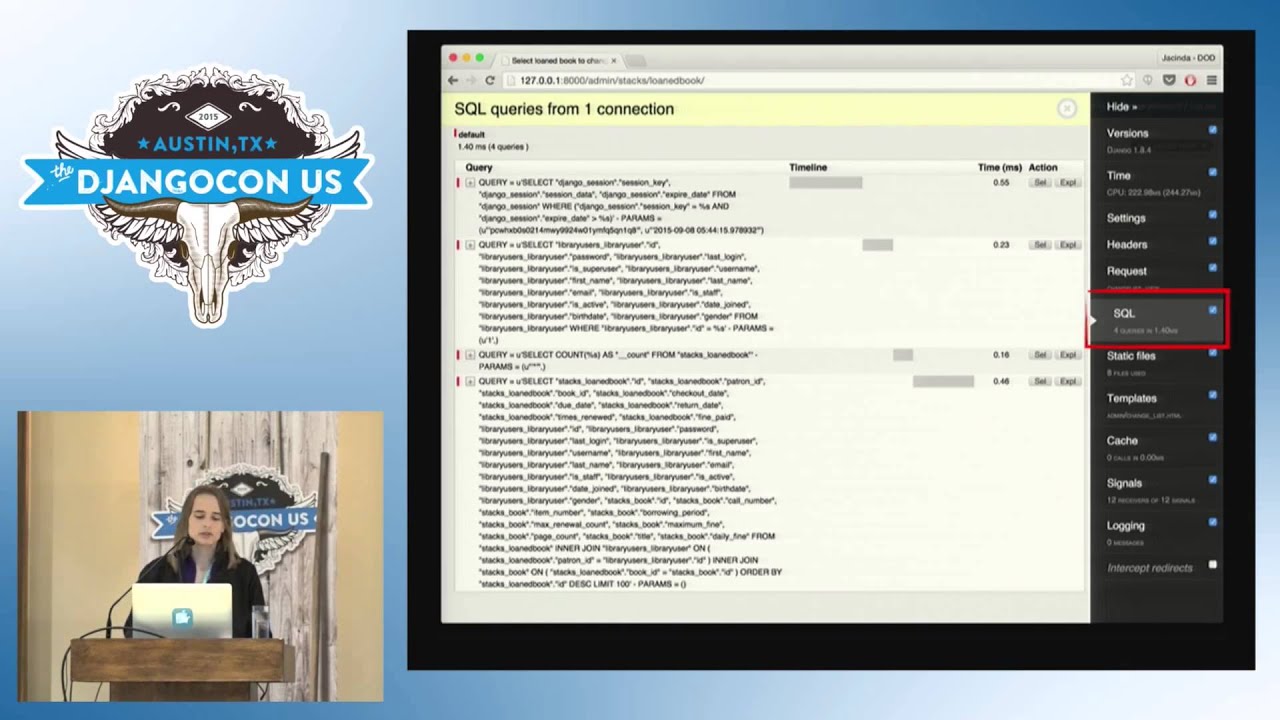
Speaker 1: Uh Django by default will show 100 rows, and you can see here we're executing 204 SQL queries every time we load this page. This this seems excessive. So what can we do about that? Well, if you click on it, Django debug toolbar allows you to see what queries are actually being executed. And in more recent versions, it helpfully includes information about which queries are actually being duplicated. So the resolution on this is a little poor, but What's happening here is for every row in that list view, it's requesting the object , the library user object as well as the book object for every single row.
Speaker 1: And this has a lot of overhead, especially if you're not using a local system. There's network latency, there's overhead to actually set up the connection. Zoomed in, you can see the specific instance that's happening, so book and then user over and over and over again. So to recap, the problem we're seeing is This was our Unicode definition. It's a join of self. patron and self. book, so the user in the book. Now Because it's in a Unicode method, Django can't go in to see that these are foreign keys and it should be using select related. So we have a couple of different solutions that we can use here. Solution
Speaker 1: one is to use list display and explicitly include those foreign keys because if you use a foreign key in list display, Django is smart enough to know to use select related in that case. It doesn't know to use it If the foreign keys that you're accessing are inside of a callable only if you use them in list display Solution two. If we wanted to keep it in a callable and not use list display, we can also set list select related to true. What this does is for all of the foreign keys on your model It will fetch all of the information for all of the foreign keys that Django can reach from that model. Solution 2b, you can actually be a little bit more explicit
Speaker 1: as of Django 1. 6 plus with list select related and specify which foreign keys. you want. So if in the list view you want to um say you're using only one of those foreign keys in the list view, but not both of them, and you don't want Django to just go randomly fetch all of the foreign keys that it can possibly reach, which it will do, and which can also be costly performance-wise. you can specify specifically the foreign keys that you're using in that list view. So say we apply solution one This is the output that we'll get. We now have two columns, one for patron that shows the name of the user who's checked out the book, and one for book, which shows the title. And we've gone from 204 queries to four queries
Speaker 1: And more importantly, we've have a 20x speed up from around 28 to 30 milliseconds to around 1. 5. This is using SQLite on a local connection. If you had a real production setup where your database server is located on a different server from your app server and you had network latency and connection overhead and Postgres uh this would be even more significant. So 20x speed up with one line of code. Alright, so a couple of notes because we can dig a little bit deeper on this. What if we had used the second solution? And if you remember I said that you can specify which foreign keys to use
Speaker 1: Um and we uh we left out list display, went back to using the default Unicode. Um and just specified patron, what happens is we end up with 104 queries because For each row in the column, you're going through and it knows enough to use select related to get all the users, but You didn't tell it that you still needed the books, so it's going through and it's executing a separate query for each row to get the title of the book. So that The reason that this is important is sometimes your requirements will change and where previously you would only wanted to show Two of the three foreign keys in your list
Speaker 1: view, your users now ask for you to show the third foreign key. Don't forget to update it in your list display, or you might have complaints about how all of a sudden the page is loading really slowly. Right, so full solution for 2B. Same thing, four queries. But one thing that is interesting to note and that is another part of Django default behavior that a lot of novices or beginners don't know um or don't realize or don't realize the implications of is that for every query, uh Django gets all of the fields. on your model. No matter how many of those fields there are, and no matter how you're doing it, whether it's through the admin or through the ORM,
Speaker 1: If you are getting a model, Django will cache all of the fields by default unless you tell it not to. So we're only using book title. User first name and user last name. But we're getting all of these extra fields. Let's see what we can do about this. Because in some cases you'll have fields that are very large And Django is fetching them from the database, even though you never use them, they take up a lot of space in memory, it's very slow. What you can do is use a custom query set. Um this is one of the most powerful features of the Django admin in my opinion and something that I actually use relatively often. I could have alternately titled this talk
Speaker 1: Custom Query Sets for Fun and Profit. So what we're doing here is the ORM has a method called only, which allows you to specify specifically which fields from your model you want to fetch from the database. So in this case, what we're doing is we're overriding the get query set method. We're taking the query set from um from the parent and then adding only patron first name, patron last name, and book daily fine. Yes, book daily fine is a mistake. That's on purpose. We'll we'll get to that You can modify the query set to your heart's content as long as it um actually returns a query set at the end.
Speaker 1: Because if you forget to return a query set, you'll get a very uninformative error that says that your database is not properly configured. I may or may not have run across that and scratched my head for a few minutes when I was working through the examples in this talk. There's also a corresponding method called defer that does the opposite of only. So if you use Query set dot objects. defer in a query set, what that will do is it will load everything except for the fields that you specify. So if you only have one really large field that you want to avoid loading because you're not using it for that query set, you can use defer for that instead. Now I did make a mistake here. Uh you know previously we may have shown the daily fine
Speaker 1: And that that worked great, but I'm supposed to be showing the title. But what happens if if I leave this mistake in End up with 104 queries again. Are we sensing a pattern? So what's happening here is the uh the query set is doing what we want. Um in that first query that's listed, we're getting first name, last name, the primary keys, and daily fine, and that's it. Now what Django has to do on every row because you did not cache the title that you needed is on every row it now goes and fetches the title because it realizes at the last second that it needed that title This is this is inefficient. It's very easy to fix. Just put the correct
Speaker 1: um the correct reference in there, book dunder title instead of book under s dunder Daily fine. But I just wanted to point that out because oftentimes if you're using only, you really want to check your queries after that to make sure that you're not using something ten lines down in the function that you forgot to get in the only earlier. Because then your data, your then Django will have to go and fetch that for every object in the query. Alright, so once it's fixed, we're back to four queries. It's great. Uh we have a minor speed up from our previous speed up. Uh it's about point three milliseconds in this case, which isn't a lot because we don't have any large fields.
Speaker 1: And we're not saving a lot by leaving out the other fields. But if you did have large fields, this would be useful. Alright, let's try something else, a little bit more complicated. One of our users has come along and asked, well, this is great, but in the books, I would like to see a list of all of the authors. So in the books list view, I want to see all of the authors Alright, this is easy. We add a callable called authors display. We add the authors display callable to list display. And because we learned our lesson from last time, we're using list select related and we're setting it to true. What could possibly go wrong? Well, 104 queries again. The reason for this is because authors is a mini-to-mini
Speaker 1: field, not a foreign key. Select related is for foreign keys. Prefetch related is what you want if you're going in the other direction. So you can see you duplicated a hundred times because it's getting the authors every time. So for Going in the opposite direction, if you have a mini-to-mini relationship or you're doing a reverse foreign key lookup, you want prefetch related. And unfortunately, there is no switch for this. In the Django admin, the way there is for select related, probably because it would be more difficult, but you know, maybe that's something Someone we'll look into someday. Instead, what we do is another custom query set to save the day, where do the same thing, except in this case we take our book admin, get the query set that Django is using.
Speaker 1: Prefetch related authors and now five queries This is the actual query that it's running. Django computes in advance all of the primary keys that it needs to get for pre-fetch related, and you're off to the races. So this is useful. You can put more information in your admin without sacrificing performance. And you can keep the admin around for longer, which means you can develop features and get your System up and running and off to the races. Alright. Last example that we're going to go through is counting. So now your users have come back to you and they're like, alright, what you've done so far is great We want to see how many books the author has written that we have in our library
Speaker 1: in the list view. Alright, we can do this. Add a callable, self. works. count. Add the list add book count to the list display. And we have 104 queries again because we have one count query for every row. This one this one's a little trickier, right? Like how do how do you deal with this? There 's no foreign key here. There's there's no reverse foreign key relationship, so select related, prefetch related, not gonna work. Are we gonna have to do like custom caching? What do we what do we do here? Well, the answer is um we use Django 's aggregate functionality. So, one of the interesting things that you can do with aggregates is
Speaker 1: annotate. And what that does is it takes an aggregate and actually adds it as a field. Sort of. And Django knows how to deal with this. So this one is probably a little bit more complicated to the beginners in the room, so I'll step through it But we still have book count in list display, but in our query set what we did is we used annotate and we said that book count should be the name of the sudo field That we're using, and we're doing a count of works. So now you can actually reference that in the in the SQL, and Django knows how to refer to that and pull that out. So now that we have this We are back to four queries once again.
Speaker 1: And you can see here the queries that are being executed where you have that as book count that Allows Django to refer to this within the query itself so you can do everything in the database in a single query. And as a side note, um You can in the author model where you've defined this callable, you can't remove the callable. Um Django kind of freaks out, even though I don't think it should. But you can set bookcount. admin order fields to be book count, and then you can actually sort by how many books an author has written. And you can order by that, which is pretty nifty. Um a few random notes before I so that's the end of all of the examples. Uh a few random notes
Speaker 1: if you have an issue and you just can't get things working fast enough and so you you want some really quick hacky solutions. Um You can decrease list per page, which will just decrease the number of rows that you have on a single page and get maybe give you a little bit of extra time. um to figure things out before like all hell breaks loose. So by default Django will do about 100. You could reduce that to like 25 and then your queries will be decreased by 4x um until you actually figure out a better way to do things. Show full result count is if you have filters. You know how it shows the count of how many objects you have in total. That's If you have a really large
Speaker 1: number of rows, that query in itself can be slow. So show full result count was introduced in 1. 8 and it removes that. But it doesn't remove the default pagination at the bottom, which also does that query. So you need to remove pagination if you're doing that. And I don't recommend any of these really as a long-term solution. They're just quick hacks if someone is breathing down your neck and you need a way to get some time to actually fix the problem. And that's the end of my presentation. Thank you all for listening. I hope this is helpful. And I think we have maybe a couple of minutes for questions, if anyone has any.
Speaker 1: Really?
Speaker 2: Hey, um okay, so you've shown us a bunch of stuff here. How much of this could be baked into Django's core, or how much of it is just something you need to be aware of? Like is there actually room to improve Django's core admin here to to avoid some of these problems?
Speaker 1: So that's that's an interesting question. I think a lot of it would have to be introspecting callables, because that's where you end up with some of the problems. Um I don't know how I'm sure that you could build that optimization in. I Don't know what the priority of that would be compared to like other features that people really want. Because basically what you'd have to do is like introspect Dunder Unicode methods to see if people are using foreign keys and actually look at all of the callables that people are putting in list display to see if they include things that could be automatically select related. Um prefetch related I haven't looked into that enough to know if it could be baked in.
Speaker 1: Have Django detect that automatically.
Speaker 3: Hi, thanks for the great talk. Um I've used Django debug toolbar to uh sort through queries of uh you know a a custom web page but I never thought to use it for the admin, so uh it's a good application. I'm wondering if you have any advice on uh You know, sorting through the list of SQL queries because it can be, you know, expansive, like you were saying, 104 or or upwards. Uh and how can you distill that down to you know exactly where is it calling all of these queries within your code? I've I've had some trouble with that and I'm wondering if you have any advice for that.
Speaker 1: So I think within the admin it's usually easier to figure out than if you're on a custom web page. Um because it's a lot If especially with like the list view, uh the queries are all going to be in order. If you have issues, it's generally because you're executing queries on every row. Um and Django debug toolbar will, in the most recent versions I mentioned, helpfully indicate which ones are being duplicated. Short of that, the the way that I typically approach it is to look for patterns where queries are being Executed on things that I think should already have been cached in the code.
Speaker 1: And There there's probably an opportunity there for someone to write a tool to actually go through and analyze some of these queries and make recommendations specific to Django about you know, how you could use the ORM to figure this out. But it's right now there's there's not much that is that you can do beyond being familiar with your models and familiar enough with how queries are executed by the ORM to be able to see the patterns. One thing that you can do that I found helpful is to purposefully uh write queries and look at the SQL that's generated. um just as a a learning experience, um because that will help you get a sense for
Speaker 1: the relationship between things that you're writing in Python and the number of queries that are actually generated.
Speaker 3: If you're using a debugger, can you like pause halfway through and and look if Django debug tool toolbar is like counting half of the requests?
Speaker 1: I don't know if you could do that with Django debug toolbar, someone else might know. But I do know that um if I'm using the the debugger and I have logging turned on so that it's actually logging raw queries, as you step through you can see which queries are being uh generated at each step.
Speaker 3: Thank you.
Speaker 4: So in terms of what Django could do out of the box, it's perhaps like a query count warning, like in debug more? Like it sees that you're doing over fifty queries just you know, print out you know this pages doing 300 queries. You know look into it.
Speaker 1: That's a good idea. Sprints are coming up. Also, just obligatory note, the company I work for, Doctor On Demand, is is hiring a Django developer. So if anyone's interested, get in touch. If there are no more questions, thank you all. I'm sure everyone wants to get to lunch.
Install Django Debug Toolbar in a local development environment and inspect the SQL panel. It shows query counts, execution time, duplicated queries, and the specific queries being run; do not expose it on a public production server.
Discussed at 4:56For foreign-key fields, include the fields directly in `list_display`, or use `list_select_related` and specify the relationships needed. This lets Django fetch related objects with joins instead of issuing one query per row.
Discussed at 8:46Override `get_queryset()` and use `only()` to fetch just the fields the list view needs, or use `defer()` to exclude a small number of large fields. Make sure every field used later is included, or Django will fetch it separately for each object.
Discussed at 13:31`select_related` does not optimize many-to-many or reverse foreign-key lookups. Override the admin queryset and use `prefetch_related()` for those relationships, which reduces the repeated per-row queries to a small number of queries.
Discussed at 17:25Reduce `list_per_page` to display fewer rows. You can also disable the full result count with `show_full_result_count`, but for that to help fully you must also address pagination; these are temporary workarounds rather than long-term fixes.
Discussed at 21:18Note: We understand that names change, people change, and bodies change. We respect each individual's journey and privacy. If you have any concerns about a video or need us to remove content, please don't hesitate to contact us. We will handle your request with care and promptly address any issues.

Published July 15, 2026

Published July 15, 2026

Published July 15, 2026

Published July 15, 2026

Published July 15, 2026

Published July 14, 2026
