
0:05:40
Creating an Inclusive Django Community with Kenya Phelps
Published July 15, 2026
DjangoCon US 2026
This video features Nick Humrich at DjangoCon US 2018 in San Diego, California, USA.
DjangoCon US 2018 - Strategies for Zero Down Time, Frequent Deployments by Nick Humrich
Deployments can be stressful, but should’nt be. We all hear about big companies deploying several, if not thousands of times a day. In order to acheive this, you have to be able to deploy without impacting performance at all; you need to feel confident and comfortable when you deploy. Even a couple miliseconds of downtime is unacceptable in these environments. Whether you have to provide SLA’s to your customers or not, being able to deploy without any downtime, allows you to deploy more often, which leads to faster turnaround time on both bug fixes and features. Successfully deploying without and downtime, however, is non-trivial. Perhaps you have heard the term Blue/Green deployment, and wonder what that is. Come learn about some of the strategies used for deployments, as well as all the changes to your code and your process you will have to make in order for it to truly work, and make you feel more confident on every deploy to production.
This talk was presented at: https://2018.djangocon.us/talk/strategies-for-zero-down-time-frequent/
LINKS:
Follow Nick Humrich 👇
On Twitter: https://twitter.com/nhumrich
Official homepage: http://blog.humrich.us
Follow DjangCon US 👇
https://twitter.com/djangocon
Follow DEFNA 👇
https://twitter.com/defnado
https://www.defna.org/
Zero-downtime deployment starts with deploying small changes frequently rather than accumulating risky releases. Nick Humrich compares blue-green and rolling deployments, then explains that the harder problem is making the application backwards-compatible across overlapping code versions, including its state, frontend assets, APIs, and database schema. He recommends expand-and-contract migrations, pre-deployment migration checks, health checks, artifacts, easy rollbacks, production canaries, shadow deployments, feature toggles, purposeful environments, separate worker tiers, contract tests, automation, and avoiding long-lived feature branches. He argues that frequent deployment is mainly a matter of confidence and culture: if deployments are painful, doing them more often forces the organization to remove that pain.
Summarised automatically from the transcript.
Automatically transcribed, so expect mistakes in names and technical terms.
Yeah, I think that's a good thing. So
Speaker 1: really quickly, I really hope you enjoyed my zero downtime slide. Um it's actually not zero, it's like a 99. 99% uptime, but Close enough. Yeah. So uh I guess I guess uh there's there's two questions we need to answer first as we get started. One is like what is downtime and why do we normally have downtime? So specifically for this talk, I'm only going to be talking about the downtime that happens when you deploy. So downtime that happens just because you have You know, code issues or whatever, um not really gonna go into because it's about zero downtime deployments, right? Um So downtime is when you deploy. You could have downtime. Either that's a maintenance window. You have scheduled time
Speaker 1: to be down, or maybe it's just the deployment process itself causes downtime. Um why is this so common? I think there's a couple answers. The most simple is that the tutorials when we learn things like Django, etc. They're not teaching us the deployment mechanism because it's a little too complicated right off the bat. They're just teaching us how to run things locally, right? So you have a command that's just run my server. And your server is now running. And so when you make a code change, you're so used to just, oh, control C, spin it up again, now my new code's running. So if we do those similar strategies. We cause downtime while we deploy. Even if it's only a few milliseconds, even if it's only
Speaker 1: seconds, it can still impact our customers. I think there's also another reason why we have downtime, specifically maintenance windows. And I think we teach ourselves that scheduling downtime is faster from a development point of view. We get into this habit because you think about what would it what would I have to do to not have downtime while I deploy? And you usually come up with like maybe a two or three or four-week process. And from that point of view, it kind of sounds like having downtime is much faster. I schedule a window, I spend like an hour doing it, now I'm back up. Right? And in in a lot of cases, a maintenance window can be faster, it can be less development time, but in a lot of cases it's not.
Speaker 1: And one example that I really like to share is at one of my companies, We decided we were going to do a maintenance window to do this big change. We had all this data in our database, massive blocks of JSON, and we had to completely change how it looked in the database. And so we scheduled a four-hour maintenance window on the weekend in the middle of the night to do it. And so we were just gonna do downtime, run the script. Take a couple hours, go back up. Well what happened was about two and a half hours in we realized there was a bug in the code and once we got like two and a half hours in we hit a customer whose data was so weird. that our script actually broke and so it didn't work. So we had to roll back, um
Speaker 1: go back up, and keep going. Well you can't do a maintenance window every hour of every day because your y that's your users would not like that, right? So we had to wait another two weeks to do another maintenance window. Um in the meantime of these two weeks we realized hey the issue was we never tested this on production data. So we copied the database, we tested it on production data, everything was fine. Right? So two weeks later, schedule another downtime, same thing. Two and a half hours in, there's a bug. What happened? Well The customer with the issue actually changed their data in those two weeks that we were testing, right? So you never know what's gonna happen. Um so again, back up. So basically six weeks later, we finally got this out into production. Right? We figured it would take us about three weeks to do it without downtime.
Speaker 1: So the reality is if we did it in the first place without scheduling maintenance window, it actually would have been faster. Now, understandably these certain types of situations aren't common, so oftentimes it can be faster to just schedule a maintenance window. But once you get in the habit of not having downtime, it actually gets really easy. So I think another reason we have downtime is because we're scared of deployments. And this is what I like to call the deployment death trap. Basically, what this means is we have downtime when we deploy. And because we have downtime. We do it less often, right? If it annoys your users if you're down, so you deploy less often so that you don't impact your users as much.
Speaker 1: Well, because you're not deploying as often, the changes that you make to production, they just get bigger and bigger And because you have bigger changes, you have more risk, right? And we all know that fear leads to the dark side, right? So if you're trying to avoid the dark side, this is This is a bad strategy. But more importantly, your higher risk actually leads to deploying less often. So it's a cycle, right? You you have these fears and because you have fears you do it less often and this just gets worse and worse and worse because things are just gonna get worse over time. The alternative to this is called continuous delivery, and it's basically the concept of taking every single commit and deploying it all the way to production
Speaker 1: by itself. And you can kind of achieve continuous delivery if your sole focus is deploying often. You want to really focus on just deploying as often as I can, basically every commit if possible. You're gonna realize that means shorter time to production. That's what TTP stands for. So the time that you finish your code to the time it gets in production is shorter because that's what you're focusing on. And because that's what you're focusing on, you're going to do smaller commits. You're not going to write big, massive features and deploy them all at once. You're going to do it in tiny bits and pieces. And because what you're deploying is tiny and small, the risk of said change of production is actually really small. You're not as worried about the deploy, you won't break as many things.
Speaker 1: And ultimately um it's gonna be easier to test. And if you do break production, if you do cause downtime, you know exactly what change caused it, because you only deployed one change. And this is also a cycle. As you start to have less stress, you start to do it more often, right? And then the last bullet point says more secure code as well, and that's kind of a hint that if you have like a zero day or a security vulnerability that you find, because you're already in the habit of taking these changes all the way to production really fast. you can actually secure your application really fast. Rather than waiting for like the next release cycle to fix this bug or doing some crazy um
Speaker 1: hotfix. You can just use your normal release cycle to just deploy your security package. So in the book Continuous Delivery, they basically say this all the time. If it's painful, do it more often. And this is like the mantra that you can tell yourself to actually fix not just deployments, but pretty much everything in development process. The concept here is imagine that like it really hurt when you tried to touch your elbow to your ear. Like just imagine that that was a ton of pain. You wouldn't really care because you never touch your elbow to your ear, right? You'd just not do it. Um But if it hurt every single time you had to stand up, you'd most likely go to a doctor, get it fixed, see what you could do
Speaker 1: So basically the premise is you're trying to push your pain and do it more often because out of self-preservation as yourself and as an organization, you will fix the pain. Right? So if deployments are painful and you're forcing yourself to do them all the time, you will naturally fix it so it's not painful. And again, this isn't just deployments, this can impact every single thing. In your workflow. If it's painful, you do it more often, and by doing it more often, you will be incentivized to fix it. For example, the keynote this morning. Right? Uh Python core developers found it really painful to do all these code reviews. So what did they eventually do? They fixed it. They made a bot. So
Speaker 1: we do eventually fix these things that are painful. So basically we need to all commit to having no downtime in order to have no downtime. And it sounds kind of silly because you're like, you haven't taught me anything, you've just told me not to have downtime. And just committing actually will kind of create it. Um so having no downtime means you don't have to deploy on weekends. It means you're not up in the middle of the night. You get to deploy in the middle of the day when traffic is hottest. Because that's also when all your coworkers are nearby to help you. 90% of the time when you get an alert, it's usually because of a deployment or a bug issue, right? So wouldn't you rather be alerted while you're at work and not at home sleeping? Right? So like having no downtime is is useful to you as well, not just
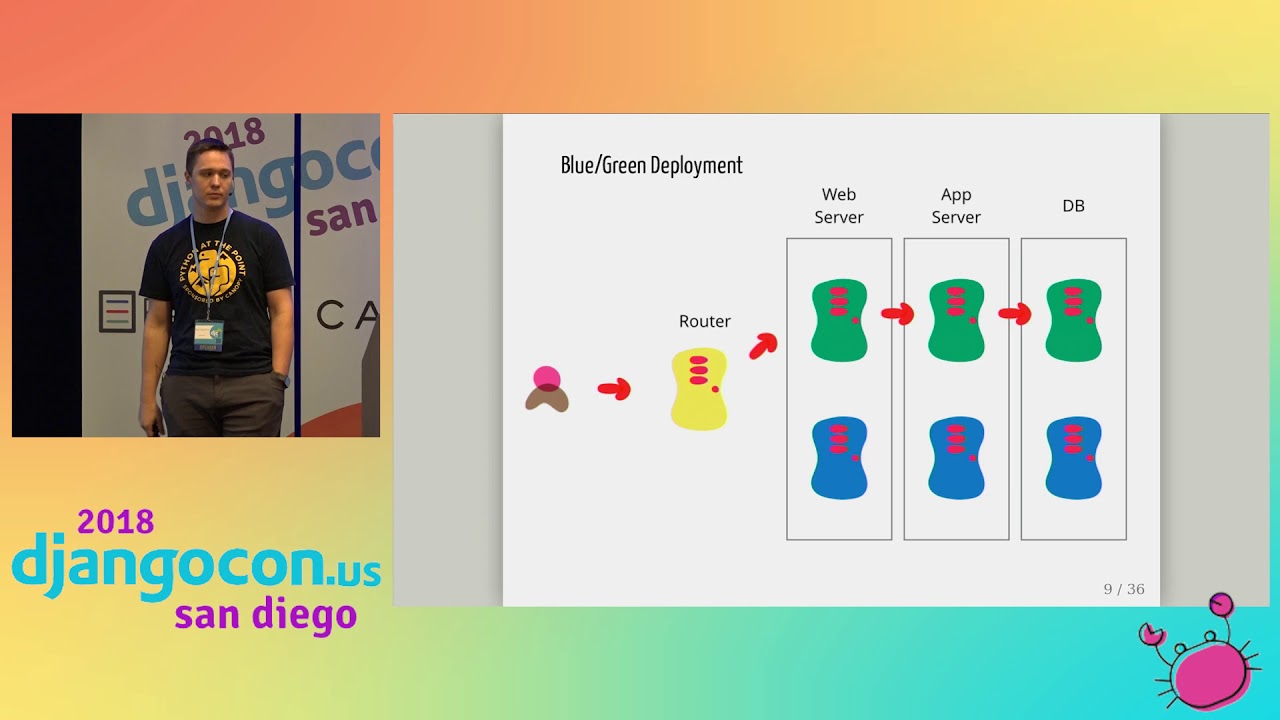
Speaker 1: your customers. So now we'll get into the details. How exactly does one have no downtime? So the very first strategy in having no downtime is called a blue-green deployment. It's really simple. You basically have two environments, a green one and a blue-green, and a blue one, hence blue-green, right? You have a router of some sort. Um specifically I've left this generic. It could be a load balancer, it could be DNS, could be various many things. And then when you deploy, you just change this arrow and you just point it to blue. So basically you have all your production stuff running on green. You deploy everything that you want to deploy to blue, and then you flip the switch. That's a blue-green deployment. There's a lot of kind of variations of this. For example, in this diagram, it has two databases.
Speaker 1: Databases are actually really hard to sync if you don't know what you're doing. So most people actually have one database. Um and then they just have the blue green. Um you can also have variations where you just do a blue green on one piece at a time. So blue-green is a pretty common pattern, but the biggest con to blue-green is the fact that If you are at larger scale, so like more than five hosts or whatever, it can start to get really costly because your two colors have to match essentially identically in infrastructure. This gets really complicated when you're doing auto-scaling, because your blue will currently have no traffic. So if it's auto-scaled, it'll now be at its minimum scale.
Speaker 1: But if you deploy during your highest load, your green's at its highest scale. So as soon as you switch, you're now going to have downtime because you've just swapped to an environment that's not scaled correctly. So this does cause some headaches of how do you scale, how do you keep them intact and the most common problem with this is just cost. At a certain point the organization just can't afford to have two production arounds running all the time. Some people say the cost is okay because they treat the blue as like their staging environment, so they can always use it. It matches production. That's fine. The other strategy is a rolling deployment. I think this one is more common to bigger places. Basically imagine you have version 1. 1. Right, is the black Pac-Man ghosts.
Speaker 1: And you're trying to deploy version 1. 2, the green Pac-Man ghosts. Basically, what happens is if you have six instances or six nodes in production or anything like that. You take one of them and you swap it out. So you put version 1. 2 on just one instance and then you wait for a period of time. Maybe it's a minute, maybe it's an hour. It's kind of up to you And then once everything's okay and you know everything's fine, you just keep going one at a time. Um this saves you from the cost perspective because you always have the same number of instances. because you're actually deploying it to the same environment. But this can get really tricky if you have stateful um services. So for example, if you're doing sticky sessions and you require servers to keep in memory.
Speaker 1: your session, this can cause issues because all of a sudden you've just pulled an instance out and replaced it. So anything pointing to that instance could be broken potentially. Right. Uh here's some here's some things that you probably shouldn't do if you care about downtime. Uh a common deployment strategy I see is People say, oh, well I have Tomcat or Nginx running in front calling this other process, so I'm just going to spin up another process, and then I'm going to change my configuration file to point to the other process. This can be a huge issue because um your two processes could share dependencies. So as soon as you install the new dependencies, you could break the old dependencies. Also, there is actually downtime when you do this. It might be milliseconds, but it is there.
Speaker 1: As it takes Nginx to swap to the new. Another common one is people just push their code straight to their deployment server or whatever, right? Get it distributed. You can push code to anyone anywhere. So just get pushed. directly to the server. And then very similar to process swap is like a directory simlink, whereas if you have Nginx calling files instead of a process. You could create some simlink file that Nginx points to, and then you use the operating system to change where that simlink actually points to. And again, there actually is downtime when you do this. It might be a couple milliseconds, but it is there. Also, this is really hard to scale. All of these is really hard to scale. So if you start to go, you know, above two servers, you have to do that for every server manually.
Speaker 1: And That's just hard. So here's some tools that actually support these both of these strategies directly. Both Kubernetes and Elastic being stocked both support them by name, so rolling deployment, blue-green deployments. Heroku supports both, but they call them their own thing because that's Heroku 's way. So if you just want like a simple solution that kind of does these things for you, these are some of the tools that do them. I'm sure there's a lot more, but these are the ones I'm familiar with. So everything we've talked about so far is actually the easy parts. It's everything that you do once, you solve once, you write once, or maybe your ops team does all of it for you. The really hard part comes to how does your application itself actually handle
Speaker 1: downtime? Because even if the deployment strategy doesn't cause downtime, the code in your application might handle When it swaps. So this is called the main the main process here is backwards compatibility. Ultimately, when your code causes downtime during a deployment, it's because it's not actually backwards compatible with itself. And so give you a couple of examples. In in the blue-green deployment, it almost looks like backwards compatibility isn't an issue. Because your client, the web server, your client, the web server, is talking to your app server, which is talking to its database. So if you swap all of them at the same time, there's no backwards compatibility issue. That's kind of the misconception that blue-green kind of tells us.
Speaker 1: But the reality is front-end code is loaded in your browser once and it stays there until a user refreshes. So even though the server serving the front-end code has changed, the front-end code already loaded in someone's browser might not have. So if you've changed your back-end server and are Old front-end code can't handle it, you've just broken everyone who hasn't refreshed. Um in the rolling deployment world, backwards compatibility is a lot more um Easier to understand, you actually have two versions of your code running at the same time. Um this gets really bad because it's not per user, it's like per request.
Speaker 1: So one user might hit green and then black and then green and then black. So everything has to work the same in both versions. Right? So in order to handle backwards compatibility, there's lots of things you can do in your application to fix this. The very first one is your applications need to be stateless. Basically, anytime you need to use a session in memory or some type of sticky sessions, you should probably shy away from that. There are some possibilities to get around this and some people do it if they have like a hard requirement on it. But basically you should shy away from anything and use a database for anything that you need statewise Uh maybe that's Redis, like maybe it's an in-memory database depending on your use case.
Speaker 1: But either way, you should use some type of data store for any type of state. Second is for all your front-end code, you should probably use a CDN. I say you can self-host it because you don't actually need to use like a real CDN, but the main concept is you need a version all of your front-end code, all your CSS, all your JavaScript, all everything needs to be versioned. And then when you reference it, you need to reference that specific version. Because if you have like main. js calling foobar. js , And you've just updated FUBAR. js, anyone who has main. js in their browser but hasn't yet loaded Foobar. js might now load it, and it might now be a new version that main.
Speaker 1: js isn't handling. So it'll actually break the JavaScript itself. So to fix this, you just version everything and so that main. js will call the specific version it knows about. And because you're calling all these versions, you essentially have to keep every version forever. It's not technically true. You can delete versions once you know they're no longer used. But if you're using a CDN like S3 or Cloudflare or something, it's actually usually cheaper just to keep it forever than it is to spend your own time trying to delete it. Um the next is your APIs themselves have to be backwards compatible. Um So basically, this means that the fields in your API, whether it's a JSON API, whether you're using templates on Django's side, the actual fields
Speaker 1: need to stay the same name. You can't rename them, you can't delete them. Uh you can totally add new fields. That's totally fine, but you can't make them required. Because a required field will break the old client. And if you really do need to change something like the structure of your API or the fields in the API, you need to use versions. And the problem with versions is you now have to maintain all versions forever because you don't know which clients are calling the old version. Now if you can control that, like you only have JavaScript, you could eventually delete the old version, but you have to make sure you maintain both versions until all clients are done using it. it. I commonly see people use new APIs rather than versions because it's sometimes easier to just create a new one.
Speaker 1: And then probably the one that most people don't think about, but is actually incredibly important, is your database itself has to be backwards compatible. So imagine I have a really basic model in Django called genre. This is straight from the Django tutorial, right? And it's just a 200 character field in your database. When you create a migration, this is the migration that Django creates. It's really simple, just creating a field, 200 characters, no big deal. But now imagine you were going to change that character limit from 200 to 100. What would happen is as soon as you ran the migration, all the code currently in the production would break because it might be inserting more than 100 characters.
Speaker 1: Right? So you really have to be careful about the schema changes that you make in your database and make sure that they are backwards compatible. There's also some weird gotchas without even changing your schema that you don't think about. So for in this example, if you notice, the only thing we've changed to the model is we've added this db index equals true field. That's all we've done. Uh the migration it creates looks exactly like it. It just says, okay, now I'm gonna index this field. This looks like you haven't changed your schema at all. But what's actually gonna happen is Most databases, for example Postgres, will actually do a full table lock on the entire table while it indexes. So now all your servers cannot talk to this table while this index is happening.
Speaker 1: Postgres has a feature for you to do concurrent indexes, so you can actually create the index concurrently without locking the table. So in this scenario you would just you'd have to modify the migration yourself to use more proper techniques. There's no easy answer here because ultimately it boils down to you need to know your database really well. Um you are gonna have issues where your database does weird things. Um for example, we we had an issue once where We ran a migration, we knew it was going to do a t full table lock, but we realized that the table was small enough that the full table lock would only take like A second at most, and we figured that was okay. We were gonna do it anyway. But there was this really weird issue where a developer actually was connected to the production database at the time that we ran the migration.
Speaker 1: And so the migration requested a lock, but was waiting for their connection to stop because they had already had a lock. So migration is basically locked and every other connection in production is waiting for the migration's locked to release. So basically production was down for 40 minutes until we realized all we had to do was kill that connection. Right. So there's going to be weird gotchas with your database, things that you will not see coming. But ultimately you have to really think about what's in your database and how is it not backwards compatible with itself. Uh basically another rule of thumb is if you have to do a data migration, there's a three-step process, but try to avoid doing a data migration or a schema migration if necessary. Data migration is basically you're taking the data in the database and changing it, but you're not actually changing the database itself.
Speaker 1: So this would be like a script you write that dumps a column, changes it, puts it back in, or something like that. Again, you can do this, but if you do, use a three-step process, which we'll talk about. And then the last hint is you should always run your migration before you deploy, not during. A lot of people, they get in the habit, you know, of just running migration, spinning up the server. So every time you spin up a server, it's trying to run the migration. If you accidentally make your migration, like let's say you're not using Django to do it, you could end up running your migration over and over. But also what's more important is you want to catch migration failures before you even begin to deploy. You don't want your deployment to fail because your migration failed.
Speaker 1: You want to catch that as a separate step. step. So you should always run your migration as its own step in in your CI before you go to actually deploy. So the three-step deploy process is actually really simple. You basically change your code to handle it both ways. So let's say you had a column genre and you wanted to change it to 100 characters. You would take your code and you would adjust it to handle both ways. You would actually make a whole new column like genre two or something. And you would take your code and you would write the code to say, hey, if genre 2 exists, use that field. Otherwise, keep using genre. Now your code can handle both ways, right? Once your code is deployed and it can handle both ways, you now run a script that actually moves the data over.
Speaker 1: So it copies the one column, adjusts the data, puts it in the second column. Since your code can handle both ways, it still works even in production while you're doing this. And then lastly, you probably want to remove that from your code so that your code doesn't have all these weird ugly if statements from days past. Right. Um you might want to remove it from your database, but maybe you don't care, maybe you just keep that data in the database forever and you just don't use it. Right. So that's a three-step deploy process. It can take a couple days or a couple minutes, kind of depending on you. Um some people like to leave step one in production for a while so that they're only migrating the data of the users who have it. haven't used the app in a while. But ultimately how fast this takes is kind of up to you.
Speaker 1: And then the last thing you need to do to your application is you need to make sure it has health checks. You want your deployments process to know if you're actually healthy or not while you're deploying. So it helps to have health checks in your application so that you can actually say, hey, I'm up, I'm alive, I'm fine, no code issues. This also allows you to automatically roll back a bad deploy. So if you have health checks that are failing, then you just roll back automatically, no problem, right? So those are kind of the simple things. Well not really simple, but those are the those are like the key concepts on how to have a backwards compatible application so that you can deploy with no downtime. So
Speaker 1: now the only thing that remains is trying to do it often. And ultimately at the end of the day, doing it often actually boils down to Um feeling confident, right? You don't do things often because you don't feel confident enough. And as long as we felt confident enough in our deployment. We would do it often, because why would why would we not do it if we feel like there's no downtime and there's no impact? So there's a whole bunch of things you can do to kind of increase confidence in your deployments. Uh I think the biggest the biggest one is artifact deployments. Artifacts is basically instead of taking your code and doing like uh pip install as you deploy. You actually want to do that once before you deploy it anywhere.
Speaker 1: This is a concept that Docker will kind of give you. Is you do all the installation, all the dependencies, everything once. You package that up into one big artifact. And then instead of your deployment process doing installations, your deployment process just takes the artifact and runs it. So if you're using Docker, that would be a Docker build. And then you just deploy the exact same Docker image every time. Um if you are using Docker, you wouldn't want to like push to stage and then push to mastery. You would actually want to use the exact same image in every environment. And that increases confidence because you know that what you're deploying is exactly what you had deployed in your previous environment. The next thing is rollbacks. You want to make rolling back your deployment incredibly, incredibly easy.
Speaker 1: If rolling back is a manual process, if it's something that's painful. You're going to be less likely to deploy because if you run into a problem, rolling back is going to be hard. So you really want to dedicate effort into making your rollback process Really simple. And in a way that your developers or whoever would do the rollback can just like click one button or a slack command or something like that. Then rollbacks are always your plan B. If anything goes south, rolling back is always an option because you're now backwards compatible, so rolling back should be fine. So it's really helpful to have good rollback process so that you feel less fear when you deploy, because you know there's always the possibility of, oh, if anything goes south, I'll just roll back, we'll be fine.
Speaker 1: The next is canaries, and this one requires kind of a little bit of a precursor. There's actually in the deployment realm, there's actually two canaries. One is what Amazon calls a canary, and one is what Google calls a canary. They're actually two entirely different things. So this gets really confusing sometimes. Um I'm gonna talk about both of them, but This one all I will reference is Amazon's Canary, which is basically an API test that runs right after your deployment. So the concept is once you deploy, you want to run a suite of tests against production. Maybe as like a real simulated user to do some key important things. And then if anything in that
Speaker 1: test fails, then you can roll back automatically. Your canaries could just trigger it. Hey, this API is now failing, roll back. This dramatically increases confidence because you can know that you haven't broken any important business processes. For example, at Amazon they have a canary that actually runs every 20 seconds that goes and buys a banana, puts it in a shopping cart. actually ships it. So they're trying to prove that like their website can actually take orders all the time because That is really important to Amazon, believe it or not. So you want to have things in production that kind of test your key features and allow you to know if you need a rollback or not. The next I'm going to call shadow deploys. This is what Google calls a canary. It's the concept of you have
Speaker 1: you have an it's kind of like rolling deploys where you swap out an instance. But instead you kind of have one sitting here as a shadow. And it either takes a replica of traffic or a very small percentage of traffic. That way you can actually test your deployment before fully committing. I think the safest way to do this is actually a replica of traffic. So you want to take your real traffic And you want to replicate it and send it against your shadow deploy, and then you can actually compare the responses of both your current server and your new server and make sure that there's not any serious differences. The replicating is actually ridiculously difficult, it turns out.
Speaker 1: So a more simple concept is you just send uh potentially like 1% of all your traffic to your new one. And then once it's up for a little bit of time and it's gotten enough traffic, you can feel confident, then you trigger the deploy. The next one is called feature toggles. Basically, this is the concept of taking a release and separating it from your actual deployment itself. Oftentimes we have business requirements that do not coordinate with developer changes. For example, you might have this big marketing push that says, hey, we want to release this feature, but we've already like got all these email campaigns ready to go and all this stuff. And we don't want you to release the feature until then, so basically you can't deploy until Tuesday, right?
Speaker 1: But if you have any security changes or small bug fixes, etc. You now have to wait till Tuesday or you have to do something different like some crazy hotfix release in order to fix those things. So if we use feature toggles Um you actually separate that release from the deployment. You don't want to use deployments to release big features because that is scary. So how a feature toggle works in concept, a lot of people use environment variables, it could be a service itself, but basically it really is just an if block in your code that says if this toggle is on. Do the new thing, otherwise do the old thing. Right? And if you have that if statement, then you can actually push out your code to production for a new feature without customers seeing that new feature.
Speaker 1: And then as soon as you turn that toggle on, now they'll see the new feature. You can get really sophisticated with feature toggles and make it so you can test the toggle in production without your customers. That you can actually test in production safely. Like we all joke about testing in production, but you can totally do it. Uh I've kinda hinted at this, but having multiple environments, so not just production. But having like a development environment, maybe a pre-production environment, is really going to help. Because you're now you now have a pipeline, so to speak, of your code that you're rolling towards production. And the closer you get to production, the more confident you're gonna feel about it. And it really helps if every single one of your environments has a specific purpose.
Speaker 1: You don't want to come um conflate a bunch of concepts into one environment, be like, oh we're gonna do testing and performance testing and monitoring like all on one environment. So it helps if you have multiple environments for each purpose and then as it passes through each environment in your pipeline you start to gain more and more confidence that the code going out to production is going to be okay. Uh this one isn't directly related to deployments, but it's really important and it's concept of a worker tier. And if you use Celery, it's very similar. you're probably going to have background processes that are doing things, long-running processes. You typically want to deploy those to separate hosts or um things so that when you deploy, those long running processes don't just get shut off. Especially if you have processes that run longer than say
Speaker 1: an hour, then that means you you don't want to deploy all the time because now your long-running processes are gonna just keep getting queued up and they're never gonna finish. So if you have an actual separate worker tier that can handle these long-running processes, it really helps so that you can deploy less often to the worker tier, but still deploy often to your web. Um testing is really big, obviously. I specifically say contract testing here because I want to emphasize that Selenium testing is not sufficient. You're really trying to test for backwards compatibility, ultimately. And Selenium testing is really brittle. And just because it breaks doesn't mean that functionality really broke. So you want really hard contract, like API tests, that if they break, you know you broke backwards compatibility.
Speaker 1: You know you're gonna have an issue. And then this is probably the hardest step at all, but try to encourage yourself to have zero manual steps in your entire process. Other than you, you know, doing the like code review maybe and clicking the merge button, at that point, everything should be automated as much as possible. We're humans. We don't work 24-7. We take vacations, right? You don't want a deploy to be delayed two weeks because your coworker had to take a vacation and they're the one who clicks deploy. So the less manual steps in your pipeline, the better. It might be a good starting point to just make it a one-button click for deployments. But this is really hard because it means you feel confident in your process itself.
Speaker 1: This one goes along with feature toggles, but not having feature branches is actually really going to help you. Future branches encourage you to work on code for a long period of time and make these big giant changes to your environment. But if we instead force everyone to only use master and commit to no branches at all, It's actually much better because people are going to do smaller, smaller commits all the time. And that's pretty much all my strategies. Um so I can take questions?
Speaker 2: Um great talk. Thank you. Uh I have a question. Well how are you handling um Uh feature flags. Is that something that you rolled your own using a service? Just curious. Thank you.
Speaker 1: Yeah, so so at my current company, we actually did roll our own. We wrote our own service to do it. We used to use just like environment variables and we would just change that environment variable when we wanted to turn it on. But then we're now very heavily invested in microservices. So we realized oftentimes a feature now spans more than one. code base and so we ended up rolling our own service to do that. You could also just use a key value store like console or something. But basically we just wrote our own so that you could just click it on and then every service gets it on at the same time.
Speaker 3: Great talk. I had a follow-up question about schema migrations. So how do you socialize the need for doing the multi-step migration? integration changes because as a developer when you have a ticket to make a change, you know, the obvious thing is you make a pull request that implements the change from one thing to the other. to another and how do you kind of socialize the need to to do it in the multiple steps like you described.
Speaker 1: Yeah so uh the answer to that's really complicated. I I think it basically boils down to you really do need buy-in from the top basically Basically, because it's a culture change, really. You have to as a culture accept that as a company you are not going to do downtime. And so it ends up becoming part of the code review. Because in the code review you now say, hey, will this schema change cause downtime? Maybe we should do a three-step process. So we actually look for it in our code reviews. It's one of the things we spend. specifically look for. But again, that requires buy-in everywhere. Everyone has to commit to, hey, we're not doing downtime. Um if you have SLAs, this is really easy because it's forced upon you. But otherwise it kind of does take um top level commitment.
Speaker 4: All right, well I'll throw one in there. Um how do you get from here to there? So if you have or have an existing deployment uh that is very manual, very very hands-on and does have downtime. Are there any s any suggestions or have you got any suggestions for how you can take that and get to eventually eventually a zero downtime? Or do you just kind of have to retool everything? can switch.
Speaker 1: Yeah, so the first step is you probably need a scale of at least two. If you just have one server, it's probably just not going to work. So that's step one. And then once you have two, really you just commit to it. If it's painful, do it more often. And honestly, that's all you need to do. If you just commit to that, you will eventually get there one step at a time by grabbing the most painful thing and fixing it
Speaker 5: I had a question about your last slide there where you talked about committing to master.
Speaker 1: Uh-huh.
Speaker 5: Um curious how you handle that, like with during review. Like usually our review phase You have a branch and you do review on that branch, then merge it to not even maybe master, but maybe somewhere else. How do you how do you guys do that?
Speaker 1: Yeah, so the code review process itself is kind of like a pull request model. So you're trying to you're basically Trying to put something on master, and that's typically where it gets code reviewed. And then at that point, once it's on master, you're basically committing To get it all the way out to production. So if it breaks anywhere in the pipeline between then to production, whereas like maybe it failed the test. You have now committed yourself that you will get master stable again and you will get it out to production. So you now kind of have to watch it and fix it, fix those bugs, etc. So that is the hard part about it. You kind of feel like you're babysitting these commits once they're merged, maybe. But I think it's actually a lot less work in the long run.
Speaker 4: Okay, with that we'll uh we'll route time. So uh thank you very much, Nick. And with the thanks.
Here, downtime means a scheduled outage or interruption caused by the deployment process itself. It is common because local-development habits encourage stopping and restarting the server, and because teams often see maintenance windows as faster and safer than changing their deployment process.
Discussed at 0:16You run two equivalent environments, deploy the new version to the inactive one, and then switch the router or load balancer to it. The main drawbacks are keeping the environments synchronized and paying for duplicate infrastructure; autoscaling can also leave the newly activated environment under-provisioned.
Discussed at 9:41A rolling deployment replaces instances one at a time, waiting to confirm each updated instance is healthy before continuing. It keeps infrastructure costs down, but can be difficult for stateful services such as applications that rely on in-memory sessions or sticky sessions.
Discussed at 12:01The application must remain backwards compatible while old and new versions coexist. That means keeping services stateless where possible, versioning frontend assets, preserving compatible API contracts, and making database changes safe for both versions of the code.
Discussed at 16:49Use a multi-step migration: first deploy code that understands both the old and new forms, then migrate the data, and finally remove the old code or column when it is no longer needed. Migrations should run as a separate CI step before deployment, and database-specific locking behavior must be considered.
Discussed at 23:46Add application health checks and use them to determine whether a release is healthy, allowing the system to roll back automatically. Production canaries can also exercise important user flows after deployment and trigger a rollback when they fail.
Discussed at 25:25Build dependencies and application code once into an immutable artifact, such as a Docker image, and deploy that exact artifact through every environment. This avoids differences caused by installing dependencies during deployment and increases confidence that tested code is what reaches production.
Discussed at 26:52A feature toggle keeps new code deployed but hidden until an environment variable, service, or other switch enables it. This lets teams deploy bug fixes and security changes independently of a marketing-driven feature release, and can support controlled testing in production.
Discussed at 31:39Start with at least two servers or instances, then commit to deploying frequently and fix the most painful problem each time. Repeated exposure to the deployment pain drives incremental improvements rather than requiring the entire system to be rebuilt at once.
Discussed at 38:30Code review can still use a pull-request model, but the goal is to merge reviewed changes into master and then take each commit through the pipeline to production. If a commit fails a test or deployment stage, the team treats restoring master to a releasable state as an immediate responsibility.
Discussed at 39:15Note: We understand that names change, people change, and bodies change. We respect each individual's journey and privacy. If you have any concerns about a video or need us to remove content, please don't hesitate to contact us. We will handle your request with care and promptly address any issues.
Published July 15, 2026

Published July 15, 2026

Published July 15, 2026

Published July 15, 2026

Published July 15, 2026

Published July 14, 2026