
0:41:09
Best Practices for Making a Wagtail Site as Accessible as Possible with Scott Cranfill
Published December 14, 2023
This video features Scott Cranfill at DjangoCon US 2026 in Chicago, Illinois, USA.
Cal-ITP Benefits is an open-source Django application funded by the state of California as part of the California Integrated Travel Project. It provides a way for riders to confirm their eligibility for public transit benefits and then register their credit or debit card so they automatically receive reduced fares when they tap to pay. This product aims to make open-loop payments accessible to all transit riders, while providing a convenient digital enrollment path for reduced fares that limits the need for in-person trips to a transit center.
In this talk we will discuss how Cal-ITP Benefits is architected with a focus on user privacy. The app utilizes the California Identity Gateway to digitally verify a rider’s identity and confirm their eligibility for transit benefits using a variety of state and federal government partners, including Login.gov, Medicare.gov, the Veterans Administration, and the California Department of Social Services. All personally identifiable information (PII) is managed external to the application; our app has no end-user accounts and only a small database for configuration.
Join us to learn how our solution…
Leverages core Django features to provide the self-service front end and the Django Admin back end that supports both transit provider staff doing in-person enrollments and Cal-ITP staff managing configuration
Prioritizes user privacy and helps transit providers administer a lightweight, compliant fare discount program that eliminates the need to store and manage sensitive rider data
Uses existing data sources rather than rider input to confirm a person’s eligibility for transit benefits
Creates a modular, reproducible digital identification and eligibility confirmation model that is available for reuse by other states or the federal government
This talk was presented by Scott Cranfill at DjangoCon US 2026 in Chicago, Illinois, USA
https://2026.djangocon.us/talks/using-django-to-deliver-public-transit-benefits-securely-and-privately/
LINKS:
Follow Scott Cranfill 👇
Website: https://compiler.la
Automatically transcribed, so expect mistakes in names and technical terms.
Afternoon everyone. All right, today I'll give a little bit of an introduction, talk about what CalITP benefits is. That's the application. that I'll be using as a case study for this presentation. We'll talk about how it's architected and the features of Django that we use to protect user privacy as they use their application, and then a little bit about what's coming next for it. So as you heard, my name is Scott Cranfill. My pronouns are he, him. I'm a senior software engineer at Compiler. And in the community, I'm a Django Software Foundation member, and if you're watching this, maybe you should be too. I'm part of the Wagtail Core and Accessibility Teams. And I come from Rochester, New York.
Compiler is a civic tech consultancy. It is based in LA and we do a lot of work with the state of California, but we're starting to branch out beyond that. But there are also a bunch of us that are around the country as well. And a lot of our work is in the public transit space specifically. Today we're going to take a look at the CalITP benefits app, which you can find at benefits. calitp. org. And I know that when I'm out there in the audience, I often like to peek at the code or the docs of what's being talked about. So here's a QR code for that. And there's a link to the docs right on the README as well All right. So what is Cal ITP benefits?
Well, we often call it the benefits app or just benefits for short, and you'll hear me do that later in the presentation, but there are two parts to that full name. CalITP stands for the California Integrated Travel Project, which is a state initiative that offers assistance to local transit providers to adopt modern technologies. like GTFS real-time data, route scheduling and planning tools, contactless payments, and rider benefits. Benefits is what this Django-powered web app provides. Writers use it to prove their eligibility for a discount, enroll a credit or debit card. and then automatically get the discount when they tap that card to pay their fare. The key innovation here is getting the discount on a contactless payment with any old credit or debit card.
Whereas before you'd have to use a closed loop system like Ventras here in Chicago. Chicagoans or regular visitors might remember when you had to load money on a Ventra card to spend it, but now you can just tap to pay a regular payment card or your phone. However, if you're eligible for a reduced fare, you still have to tell the bus operator or the train station attendant and get them to manually adjust that fare before you tap. Cal ITP Benefits makes the discount automatic by enrolling your card with the back-end transit processor that handles the fare collection. Let's see what it looks like in action. This is the homepage of Cal ITB Benefits running in my local dev environment.
The first thing a user does is they choose what transit provider they work with, and here I've got my test one called California State Transit. Not a real agency. Then you choose what kind of discount you're eligible for. Maybe you're a Medicare card holder, you're over 65, or you're a veteran, for example. Let's say I'm an older adult. And the next screen tells me that I'll be going to login. gov to verify my identity and eligibility. So we'll continue on to that. This is the login dugout sandbox, and in the sandbox we can create test accounts that prove you know fake that they are, you know, as an older adult, I'm not really 65, but this test account says I am.
I'll talk about this screen we're redirecting through in a little bit, but now we come back to the benefits app. It tells me my eligibility is confirmed, and I will click enroll to go to the transit processor. which is called Little Pay to put in my credit card information. We'll use a standard test number here. 'Cause this is also Little Pay 's dev environment. And then Because it's little pace dev environment, it's a little bit slower than production, but in a couple seconds it will confirm that Live demos.
There it is. Next time I use that card on the bus, I I would get that discount automatically. Now that was the self-service enrollment pathway, but there is also an in-person option. So for transit agency users. . If they have customers that want to come to them and get help, they can log into the Django admin using an agency user account. Here's my test CSS CST user account. And here they're presented with an option to do a new writer enrollment. We'll choose the older adult pathway again, and then they're presented a checkbox to confirm that they verified their ID and that they are in fact 65 or older, click continue, and
we get taken to the same little pay interface in an iframe instead of a pop-up And that at this point the the staff person might hand a tablet to to a person so that they they can enter their own card details, for example. And submit that. And it'll come back and it will tell the it'll confirm success and the staff person can let the person know they can go on their way and get the discount automatically. I'll just tab away while this finishes. But there, oh, there it is. Okay. All right. That's the demo. Our app
is still small but mighty. It is growing rapidly, though. We're still a ways from our dream of being available to every transit writer in California, but We have an expected increase of 200% in our participating agencies in this calendar year And if you look at our year over year data from 2024 to 2025, we had a 304% increase in enrollments. That's cards registered. and a 135% increase in actual reduced fare transactions using those enrolled cards. But this is DjangoCon, so let's get into the details of how we built it. Here's a brief overview of our tech stack and how we collaborate. We use Microsoft Azure as our cloud infrastructure provider.
Terraform helps us make sure that that is versioned and consistent across our environments. Django, of course, provides a wonderful platform for this kind of application with all of the built-in features that it comes along with and great package ecosystem. We have a very small Postgres database, which is used primarily for configuration, just setting up how the app works, what agencies are in it. We'll look at that more closely later. It's just vanilla JS and CSS, because for something this simple, why use anything else? We use VS Code dev containers because we have some developers on Macs and some on Linux, and that keeps our development experience consistent and predictable. And we do all of our collaborating on GitHub.
Our source code, our issue tracker, our documentation are all open source and publicly available. And this prevents vendor lock-in, that includes us, we're a vendor here, and it ensures transparency into the work we perform, which is something we really value when working on services for the public. Of course, GitHub Actions powers our CI and CD as well. It deploys our Terraform changes and our application itself. Yeah. Let's recap the high-level concepts that we went through in the demo. After selecting the transit provider and the discount you're requesting, there are three parts to the core workflow. The first is authentication. You prove your identity using a service like login. gov or maybe Medicare. gov.
Second is the eligibility piece, confirm that you're eligible for the discount using some service that applies to what you selected. For example, if you're a veteran, a va. gov API call is made to confirm that. In the demo, login. gov itself verified that it my test account was over 65 because it has that date of birth information and no other service was needed. And finally, enrollment. Register a card with the payment processor to automatically get the discount when using it to pay your fare. In the demo I use LittlePay, but Switchio is the other one we currently support. The CaliTB Benefits is a simple app. It is really just a facilitator stitching together a network of identity verification providers and transit processors to deliver quick and easy rider enrollment.
It also provides transit agencies choice as partners continue to grow. For example, if they wanted to change their transit processor, that can be accommodated. once they've signed the contracts with a simple configuration change in the Django admin. And we've been talking about public transit discounts, but this workflow is a replicable model. And it's already been used in another app that Compiler developed to help Angelinos who were affected by wildfires replace their vital records whose physical copies they might have lost. In that case, the verification piece was that they lived in an effective zip code, and the enrollment piece was submitting a form to request the records that they needed to have replaced.
To visualize it a different way, sorry this is a little bit smaller than I wanted, but this is a sequence diagram of how the veteran discount flow. works to illustrate the different pieces of the puzzle here. And the key piece that I haven't taught touched on yet is the identity gateway or IDG for short. The IDG is a piece of software developed in-house at the California Department of Technology that facilitates digital identity verification and eligibility verification. It's the layer that securely receives personally identifiable information or PII from those services and returns the eligibility result to the client application like benefits. So in this diagram, Benefits makes the eligibility verification request to the IDG, which then
does three things. It connects the user to login. gov to verify their identity. Then it gets the PII back from login. gov and uses that to ask the VA over here, hey, is this person a veteran or not? And then it returns that answer back to the IDG, back to the benefits. If the answer is yes, the rider is eligible. Benefits then sends them over to the transit processor so they can enroll their card. Let's talk about how this workflow manifests in the architecture of our Django project. The overall flow is a series of class-based views, primarily form views, that just take a single user input. like which agency they ride, what kind of discount they're wanting, and
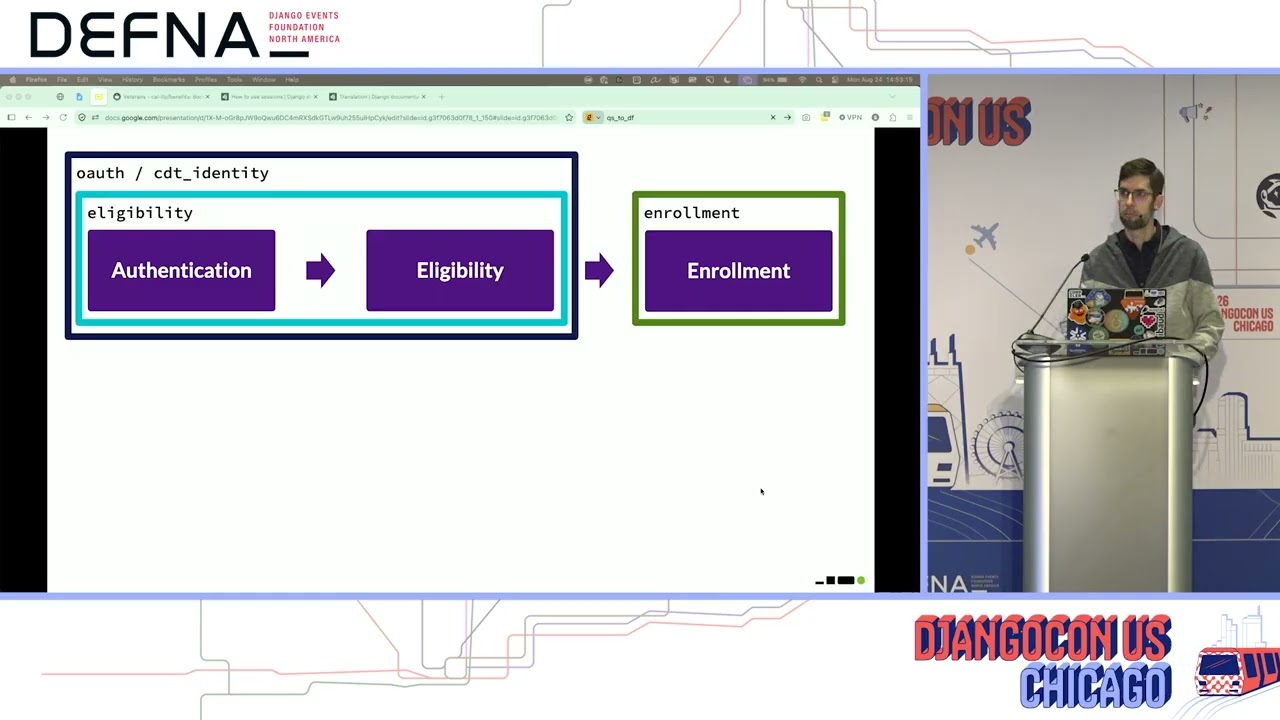
moves them on to the next step. We modularize the code base by splitting it up into separate, sometimes interlocking Django apps. First, the authentication and eligibility piece, which is really experienced by the users as a single process, are both housed in the eligibility app. With help from a small OAuth app, which configures the external library that we spun out of benefits called CDT underscore identity. That uses the OpenID Connect protocol to connect to the California Identity Gateway to broker the data from the verification services and return the decision. If the decision is yes, then benefits moves into the card enrollment phase housed in the enrollment app. And this is where we direct the user to the third-party transit processor where they enter their card details.
We also have separate helper apps, not shown here, one for each transit process processor that we support, which implement the details that are specific to them. And then we have a core app that helps orchestrate everything. And if you're wondering why the OAuth app is separate from eligibility, that's because we have two other methods for checking eligibility that don't involve the identity gateway. I already showed you one of those. That's the in-person process. The other is a legacy method for agency-specific writer programs that I'm not going to delve into because we're starting to do deprecate that functionality. But back to in-person. That process leverages some of the same core functionality from the eligibility and enrollment apps.
But it also has its own in-person app that overrides or subclasses certain views and forms and defines its own templates to fit in the Django admin. Then we use stock Django authentication for providing the agency users access to do their in-person enrollments. This is not an exhaustive diagram of all of our Django apps, but it does illustrate the most interesting bits. I've already demoed how the Django admin is used by agency staff to handle in-person enrollments, but let's now look at the other side of it, how we use it to configure the app. Okay, and another separate instance here. Instead of logging in as an agency user, I'm going to log in as the admin
user. Uh CSRF. Live demos All right, as you can see, we don't change it much. It's primarily a place to easily edit the configuration data that we've modeled in the various apps that we just talked about. And the standard standard model admin setup works well for most of our needs. First, we inherit the up here, ignoring the authentication stuff from the standard Django models, we inherit from CDT identity package. the models that we use to configure our connections to the identity gateway, and what information we are looking
to get back from that, depending on what the user is claiming. And then our core app is where most of our models live or the basis for those models. So for example, each transit agency that has joined the benefits app has an instance of the transit agency model where we can figure basic details, you know, important strings that we display on the website, what enrollment flows that it supports, what card types it supports, and which transit processor config to relate it to, which we'll come back to. Those enrollment flows have their own model with an instance for each, configuring things like whether they support
uh whether they support self-service enrollment, in-person enrollment, or both. How we connect to the IDG to get that information and what claim is related to that. And in some cases, they might have an exploration feature and that can that there's some configuration here for that as well. The transit processor config that each agency has is an abstract model, so it's not listed here in core. But we have more specific config models for each of the processors we support that come from those helper apps I referred to, enrollment little pay and enrollment switchio. And each of those holds the various details about how we connect to those processors, API endpoints, keys, things of that nature.
And then there are the groups. Groups are a key piece that relate agencies. relate a specific agency to a specific enrollment flow, and then it has the group ID that goes with that processor. So if a CST writer registers for a discount as an older adult. Little Pay registers them in their system with this group ID. There are some other bits in here, mostly around user management that aren't worth going into. But the headline is that this setup allows us to bring new agencies on board without touching a line of code or doing a deployment. We're actively working to make enrollment flows entirely configurable within the admin as well.
We do add to those less frequently though. Okay. Now let's talk about privacy. As you've seen, no user account is required in the benefits app and no writer information is stored. So what is the secret sauce that enables this kind of privacy-first user interaction in a moderately complex app? It's Django Session Framework. Sessions can be complicated, but the most basic use case, which is all we need here, boils down to these two quotes from the Django docs. The session framework lets you store and retrieve arbitrary data on a per-site visitor basis. It stores data on the server side and abstracts the sending and receiving of cookies.
Cookies contain a session ID, not the data itself, unless you're using the cookie-based backend. And when the session middleware is activated, each HTTP request object Which is the first argument to any Django view function, will have a session attribute, which is a dictionary-like object. You can read from and write to request. session at any point in your view, and you can edit it multiple times. So the key way that the Benefits app takes a user through the flow without requiring any kind of account is by writing and reading session data. Let's take a look at how the session data evolves over the course of a self-service enrollment. The right side will show what the session dict looks like after a route is loaded.
Starting from the homepage, any session data that previously existed is cleared out and a fresh session is initiated with four pieces of data. The session start time, two generated IDs that are largely for following a session over multiple analytics events, and the origin of the current request, which will get updated as we go along. On the homepage, a user selects their home agency and then is moved to slash eligibility. The chosen agency's database ID is added to the session and the origin is updated And that's what the session now looks like after loading the eligibility route. Then the user selects what discount they believe they are eligible for, and several values are set depending on what was selected.
Flow is the database ID of the selected flow, the older adult flow in this example. And because the older adult flow flow goes through the California identity gateway. We generate two CDT underscore IDG IDs that it needs for the OAuth handoff. Then we move to eligibility start and the origin is updated again. The user clicks the button to acknowledge that they'll be leaving benefits to go to the verifier, which is login. gov in this case. It 's just brokered by the identity gateway, and we have an intermediary view at OAuth login that redirects them there, but no session data is changed here. Once they have logged in on login. gov, given their consent to share information back to the identity gateway and been redirected back to the benefits app.
They land on the OAuth authorized route, which stores the response received from the IDG on the session. That's the verified age 65P is true dictionary there. And some simple flags indicating that they successfully logged in and were verified as eligible. They are then redirected to slash enrollment. which identifies that the group that the writer should be registered to. This is the ID number of the group configuration object in our database, which stores the transit processors group ID for that agency's riders in that particular discount group. And when the user clicks the button to go to the transit processor, we pass along that group ID so they know where to register the card that the user enters. The user's payment card details are only given directly to the transit processor and they only store tokenized values
which get compared when the user taps on a reader. No payment info even anonymized is stored by us. And once the processor has gotten that data, they send them back to us and we store the results on the session. On success, the user is redirected to enrollment success, and the final session update is to the origin value, indicating that it was complete. So what about analytics? I touched on that at the beginning of this process, but to elaborate throughout the whole process, the session data was used to send multiple analytics events that follow the user through this session. So that we can look at the journeys and dig into details if something weird happens. And also just follow trends about how many eligibilities fail and that sort of thing. The only meaningful data that we collect are items specific to the application, like which agency they ride on, what kind of discount they're enrolling for, along with common things like their user agent, referrer information, and a location that's no more specific than
city. We collect no identifiable information, not even IP addresses. We do store some data in the database for successful enrollments, primarily as a way to know which transit agency staff are doing those in-person enrollments. When an enrollment is done in person, the verified by field shown here will show the staff user's real name. But this example shows a slug for the particular self-service verifier that was used. As you can see, there's no writer information here either. As I start to wrap up, I just want to give a little peek about what's coming next for the Benefits app. As noted earlier, we're always working to bring more agencies on board and where you have a solid number within the pipeline. We've also recently begun a project to onboard the first non-California agency.
to offer the benefits app to their riders. This began as a California project, but the state is supportive of offering it to agencies in other states, which we think is wonderful. This agency in Florida uses a transit processor that we don't yet support, and adding that support will enable more California agencies to use who already use that processor just for contactless payments to get into the benefits app more quickly. We're also working with LA Metro on the first use of benefits that doesn't end up in a tap-to-pay discount. They'll be distributing transportation assistance funds to eligible riders through a limited number of prepaid transit cards. And we'll be using benefits to verify their eligibility, then submit their application to the program. This alternative enrollment is a first step toward potentially supporting other non-transit
use cases in the future. A popular example we have is you know discounts for going to a state park. And that would use the same basic authentication, eligibility, and enrollment pattern. One other quick shout-out for another Django feature we love. We use the translations feature quite heavily. We currently support English and Spanish, and we're this LA Metro program will be expanding that to 10 languages. So we're really looking forward to that. In conclusion, I hope what I've shown today inspired you to consider next time you're starting an application kind of like this, think about how you might deviate from the expected application architectures to ones that put user privacy first. and leverage all the wonderful um included batteries that we give the Django. Thanks for your time.
August 24 - 28, 2026
Chicago, Illinois, USA
Note: We understand that names change, people change, and bodies change. We respect each individual's journey and privacy. If you have any concerns about a video or need us to remove content, please don't hesitate to contact us. We will handle your request with care and promptly address any issues.

Published October 26, 2026

Published October 26, 2026

Published October 26, 2026

Published October 26, 2026

Published October 26, 2026

Published October 26, 2026
