
0:27:23
How Django Gets Released: Behind the Scenes with Natalia Bidart
Published July 11, 2026
This video features Natalia Bidart at DjangoCon US 2026 in Chicago, Illinois, USA.
A feature built the traditional Django way. Making it dynamic is next. What do you do? The answer is simpler than you think!
Starting from a plain server-rendered implementation, my goal was to avoid full-page reloads without throwing away what I had already built, and without reaching for a new tool or a new architecture. Template partials and HTMX turned out to be exactly the right fit. The changes were small and targeted, the code stayed readable, and I never had to leave my Django safe place.
This talk is about a real project, real decisions, and what progressive enhancement in Django can look like in practice using modern tools, one small change at a time.
This talk was presented by Natalia Bidart at DjangoCon US 2026 in Chicago, Illinois, USA
https://2026.djangocon.us/talks/wishlist-granted-htmx-without-betraying-your-django-views/
LINKS:
Follow Natalia Bidart 👇
On GitHub: https://github.com/nessita
On Mastodon: https://fosstodon.org/@nessita
Automatically transcribed, so expect mistakes in names and technical terms.
Speaker 1: Okay, thank you everyone. Good afternoon. This is as Koja said, which is granted, granted, HTMX without betraying your Django views. This is um talk that a lot of people have been saying. Oh I'm looking forward to your talk, so I'm a little bit nervous about weird or not weird but difficult HTML questions. So the first disclaimer, I am not an HTML expert at all. I've just used like three things that work all the time. It's a perfect recipe, but um we'll try to answer the questions that arise. Okay, so um uh a small intro. This is me, Natalia Amadianko Fellow. I also known as Nessita
Speaker 1: since forever. I'm a part-time Django Fellow. That means that I work around 20 hours a week in for a DSF. And I'm also a part-time contractor for Repsis, which is um Django Consultancy Agency. Um in general I've been always doing backend work. So when someone will say CSS or JavaScript or fancy things in in in in the browser, I'm a little bit like no, I like to be a little bit back. JavaScript and I ch and I have always kept a very polite distance. I don't bother it and JavaScript doesn't bother me. But at some point there was a change for that, for the work that I was doing for the contracting
Speaker 1: agency for IPSIS. So how is this talk organized? We have three sections. One is this intro. I'm going to talk a little bit about the motivation and how I ended up doing the work that I did and why I decided to share it with you in this conference. Then we're going to try to be a little bit more hands-on. I will share what I call a recipe, a recipe that worked for me. and for the project. And then I'm going to show a little bit sorry for the recipe we're going to use a simplified version of a wishlist feature. And then at the end I'm going to share a little bit of closing remarks uh including showing the actual site that uses this weasley feature that we built with um repsys
Speaker 1: So, what is the context for this? While doing this contractive work, I've been with the same client working for around three years already. And about a year ago there was a new issue assigned to me, which is this is uh the project that I was working with is a Dango marketplace for aircraft parts. That's that's something that is amazing because you have like this side where you can find you know big wheels and you can find wings and you can find sp special oil for for uh aircraft. So I have also learned a lot around um aircraft and it's very challenging because there are a lot of parts for a lot of different kind of aircraft. And um
Speaker 1: one of the things that wanted to be added is during the flow where you will be browsing the different parts of for aircraft The goal is to have the user being able to store something or create a wish list or store a given product in a wish list. The idea is to do that in a way that a customer will not leave the product page, you know, because that that that's important important in a marketplace. We are trying to sell things, which is like the main things for for for for a marketplace. You don't want the user to leave a product page and potentially never go back to actually complete the purchase. So um in order to do that
Speaker 1: I received um um Spec as a a dedicated UI UX company design how it should look like how the different flows should look like how you are in a product page and how you should stay and and login if you are not logged in and be able to create a wish list The um design itself had a lot of elements that were very new to me, very s strange in a way, because these weren't like the traditional You have a URL, you go to a page, you do something, you submit a form, and then you end up in another page and continue to do that. You will always the design was always in the same product page you have to interact with a lot of different logic. But
Speaker 1: it that design also required a specific component to be built that wasn't available. So the first part of this project was a joy for me because I didn't since this fancy component wasn't available, I could just start with everything backend, you know, the traditional Django views, I could do all the full page renders, I could have uh confirmation pages for delete uh um operations that you have you know everything as i knew it so far so that was very entertained. So I designed the models, I designed the different views for creating wheeles, deleting, adding items to it, and a few other things. But as I was saying, there was a catch to that. I always knew that at some point I will have to
Speaker 1: transform this very bread and butter diangle into something that would be much funcy. I have no idea how that would work. I was only focused on um building robust code, correct code, fully tested. I tried all the flows I try I was trying in on the browser. And that was a way also to show progress to the client that was paying for this work. But at some point Jacob, who is there team t teammate, he said This super complex element is ready, so you should in you need to integrate um what you have done, which is completely server-side, into this fancy thing which was
Speaker 1: really a m a model, like you would have you know this pop-ups very fancy in the product page and you will be able to do things with it. So this is when I started asking questions how to integrate with that? How can I grab the things that I already built which was a time investment and money investment. I don't wanna throw all that away. So I had like the core pieces, the models, the views and the business logic around. But I didn't wanna to just throw everything away. I wanted to try to have both ends meet in a healthy place. So how I did it? Well It was a little bit um how I ended up in this is was a little bit organic, a lot of help from from my teammates, a lot of reading.
Speaker 1: At the time LLMs, this was a year ago. LLMs weren't that popular, that available. So I did it all without an LLM. Looking back then I was like I was fighting a lot with a lot of things. And um I think it's worth mentioning at this time. So we're going to see the recipe. For the recipe we're going to have a few ingredients and I'm going to talk about them. But before that, there is a small recording of this baseline that I built, which is a very uh simple wish list site. This is uh in in in GitHub, this is some code that I will share. But basically, this recording is showing what I built. This is the recording where there is no
Speaker 1: HTMX involved at all. So you can see you have the different operations to create a wish list, to rename a wish list, to delete it, to add items to it. And I'm not sure if you see in the um nabar There is like a pony in a timestamp. That pony and that that timestamp will change every time there is a full page render That thing will sort of like update the timestamp to the current um time and also the pony will say hi So this is sort of like as I will show the different parts of the talk and and the different recipe. We'll start using a little bit of HTMX And then we will start seeing how that nut bar doesn't refresh anymore because we will be replacing parts of the template
Speaker 1: um with fragments and not reloading the whole thing. So let's go to see the ingredients. As I said, there are three. One is temple partials. Karen talked about this this morning in the keynote about how great they are, these are really fantastic. I mean you have a way to in your template define a section of it, put a name to it, potentially render it as you define it, and then you can use it in a lot of ways. Particularly you can use render, like in your view, you can just use render and the usual syntax where you define which template to render, but you can use the hash, the partial name syntax to just render that.
Speaker 1: small part of the template. You can also in other template in in a template itself, you can use partial a partial name and that will in that place grab whatever partial is called partial name and we um render it there. The other option in how to use partial is just like the classical um include tag You can just define the template name with the hash and the and the partial name. And that will also you can you include different parts of a template in in in other templates This is an example for ex uh this is an example. Um this is from the code that is in the repo. You will have the wish list detail page, and in that case, um within uh deep
Speaker 1: There is a definition for the part of the template that renders a detail of a wish list. The other ingredient is HTMX. HTMX as you see there the first thing is a quote from the HTMX site itself. It said it's a library that allows you to access model modern browser features directly from HTML rather than using JavaScript. For me this is like so appealing because JavaScript and I w we don't we don't interact. So This is giving me the option to do things with JavaScript without actually having to use it. So that for me is like So exciting using the word it from from Karen. It's it's you know, at some point in in my previous
Speaker 1: job there was this need to make uh front end more dynamic, more interactive were the words. So you all of a sudden all your views in Django, you have to transfer em everything to use JSON. You need to use JSON endpoints and provide information. You needed to um redo the validation that you have a little from the forms to be endure big javascript framework. Which HTMX X sorry the server still returns HTML. So you don't need to migrate to different endpoints, API with JSON results. You your views keep returning HTML. And for me that is Fantastic. It's because you have your traditional template. You might add some
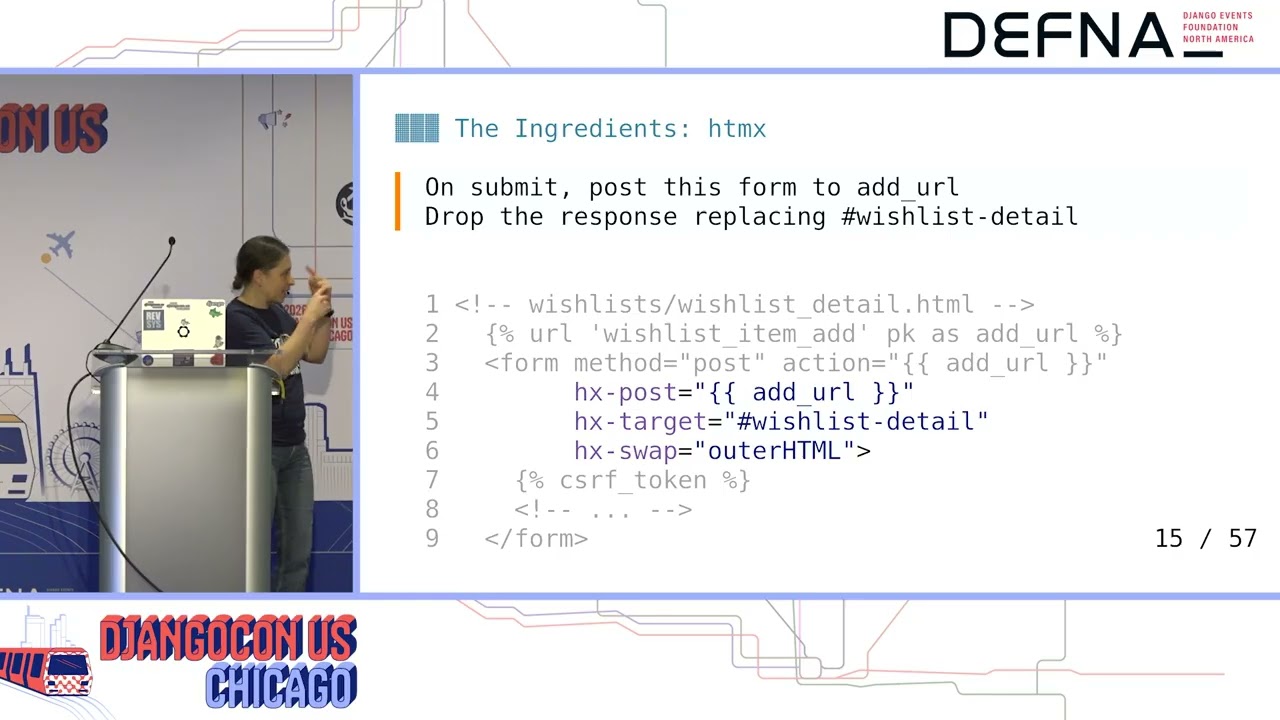
Speaker 1: specific attributes, which are the HX. perfect attributes that will then indicate the browser how to operate and what to do with those So basically, from the point of view of the developer, you never leave traditional Young Ws and the traditional templates, which are HTML, in your responses. This is an example. This is also the wishlist detail page. This is inside the dip that I showed before. It's a form where you can create a wish list from there. I will show an example. So this is the site running in my machine and for creating a new wish list.
Speaker 1: You have what I'm showing here, which is okay the traditional form as we know it, we will post the form data to the add URL um URL. But also if we add the HX post, it's very difficult for me to say HX something. My tongue is always get entangled with it But we have HXPost, HX Target, and HX swaps. So there are three things from HTMX that will make that form behave a little bit different. So how particularly? Well, um e check, post, or get are the verbs that when that form is submitted, the verb that is going to execute, in this case a post. HECTARGET means that
Speaker 1: whatever you get as a response from the view, from the add URL view, it will be swapped into whatever whatever HTML element has the ID which lists itself, which is the one that I showed you in a few slides before. And there is another thing, these are the three things that I use and nothing else, right? Um the edge gate swaps, which indicates once you located that element with a given ID The replacement, we can say whether that happens at the deep level in this case or inside the deep level. The default is the replacement happen inside. the element that is identified with the ID, which is inner HTML. We generally well in my case I've found myself always having to define outer HTML
Speaker 1: because I'm usually returning the fragment that contains the div itself. Also, every time you trigger an action via HTMX The request itself, the request that reaches the Django view, will have some specific A check headers, particularly the header HEX request will be set to true. So that's a way to directly know whether you are getting an HTML request or not. There are other headers involved, but we are not going to focus on those. The other amazing uh ingredient ingredient is the glue that has the angle meeting HTMLX. This is something that Karen mentioned. Django HTMX is a package that provides a minimal abstraction layer between these headers that I mentioned, the HAC requests, and what we use in the Django
Speaker 1: views. It basically via a middleware will um have every request has available an HTMX attribute, which is trust D. And it's actually an instance of HTML details where you can ask things to it. The Yango HTMX will also provide a few more other helpers that we will see that are very handy. I'm just put the names there, but we will see how to use it later. Okay, so now I'm going to show a few diffs uh in the next section. I just wanted to say that I intentionally crafted all the code in the templates and in the views in a way that the f the diffs will be minimal. That's intentional for educational purposes. Sometimes the diffs are not that clean. But if we do a good job in how our HTML is indented uh
Speaker 1: intent and how our views are um defined, uh we will get very small divs. So what do we need to do? We need to grab and have HTMX available. Particularly what I usually do is I grab a vendor copy of HTML, of sorry, HTMX, and I just put it as a script. Which is the the line that you see there. But there is also a config thingy that is put there that is worth mentioning because By default , HTMX one and two, which are the current versions, will have if you define like an apparent element , H HX elements like the swap or the target, those will be automatically inherited to the children of those elements. So sometimes you get unexpected behavior for things that have been inherited.
Speaker 1: With that line, the inheritance is disabled, so every time that you want a given behavior in uh HTML element, you will have to define all the HX attributes explicitly. This is also something that the HTML creator itself, himself, sorry, says the bigger mistake made in this I need to oh There you go. The biggest mistake in HTMX 102 was making attribute inheritance implicit. They say that they took the inspiration from CSS. But they are now releasing an AHCMEC4 version where the default was going to be is going to be not inheriting the um attributes. Well then of course we need to add Adjango HTMX to requirements file and we need to add
Speaker 1: Django HTMX to the install apps. And add the crucial middleware that is the one that will allow allow us to check the HTMX variable on any request inside a view. So all the all all the secret source is just in a view you will use this is this request an HTMX one? If yes you will take a decision, if no you will do something else Right? So that's basically the the the secret to all of this. But then the rest, everything that you have, all your forum validations, all your saving instances, and different business logic does not need to change at all.
Speaker 1: So let's talk a little bit about one example, the first example, which is what I call the first swap. This is in the wish list list template, which is the home page. This is the homepage. So as you can see, when you when I click in the NAT bar, the pony says hi because it's fully reloading the whole page. But um when I go into see the details of this wish list. The pony didn't say hi. And this is using sorry this this is using this code that we see there. In the link That is saying, okay, if you click here, you will see the wish list detail from the wish list page. We have a traditional href
Speaker 1: For the link, so if JavaScript is not enabled, that just works. You have the right URL. But if JavaScript is enabled An HX get is going to be triggered with which is a GET request to your Django server and it's saying what part of the template, which is like the content section, will be replaced and which uh with with strategy. In particular the base template how I have it it has a main content area so I'm going to swap the whole thing because the detail information for a wish list uses the whole content area. And there is a subtitle there which is HX push URL, which is set to true because When you click on something, even if we do this magic HTML thingy, we do want the URL to change.
Speaker 1: We don't wanna if we weren't like in in our home, in our app, and you click on uh which this uh a specific wish list, we want the URL to reflect that because of the back button or because if you do a five or or reload the page, you want the user to rem to to be in the same page that it was. Then uh what happened? So we said in a in a element we have now the ability to be a JavaScript sorry. issue a get that will go to a given URL. So what happened? The response will be swap in content, but what is the response? How do I do that or the bad Well, um particular c here I'm showing class-based views. This is what the project uses, but this is also
Speaker 1: implementable with um traditional function-based views. For class how many people is a um familiar with class based views? Okay, almost All of you. Great. So there is for for the different class of views you have a given set of views that provide some abstraction of functionality for delete things for C details of things for listing a collection of things and all of them they have something in common which is um the method get template name that's met that method is used when the whole view ends up rendering a response to return to return to a server uh to to the request. you say which simply to be used for that request.
Speaker 1: In this case, I'm highlighting there the only two lines that need to change In whatever classical view you already had, in this case the wishless city, when you want to just return a fragment So template A will presumably be defined in your view, otherwise Tango has the false for them. And the only thing that I had to do is okay, so just in order to be able to click on a wish list um link and get just swap for the part of the wish list detail. I just need to say okay if this is an HTMX request just re return the partial that we define a little bit sooner. This is particularly how the partial is defined. The whole detail, leaving aside all the footer, all the header, is defined in that way, and that's the thing that the response is returning for an HTML request.
Speaker 1: So let's see another example. This is as I showed before how to add a URL. This is the same. We can do a post from a form and we set which target is going to be changed. Oh sorry, this is not to add a wishlist. This is to add an item to a wish list. So we are in the wishlist detail page where you have all the items that are already in your wish list. But you have that there is a form. So I hear in I'm in a wish list with no items in it, so I can uh I can add things to it. And as you can see, the napper didn't um reload, the pony didn't say hi. I'm going to add another one.
Speaker 1: This is the form that I'm showing here. We have a form to add an item to the wish list where we're saying, okay, so when the form is submitted, we're going to go to the add URL. and whatever response you get back, we're going to replace the which list TLD, which is the whole thing. This is basically because we need to reload the list, right? If we will add something and not reload the whole thing, we wouldn't see the new item added to the list of of of products. The other super interesting thing is that as you can see in a wishlist detail, you have some delete buttons. Well are not buttons, they are actually links. If JavaScript is disabled, you will have, if you click on them, you will go to a full new page with a confirmation
Speaker 1: form. And you might submit it and then your wish list, um your wish list or your items get deleted. These are really links. And you know, traditionally with HTML it's not like you can post from a link. But well HTMA allows you to do that. This is as you can see uh we can define the HX attribute as we saw the post target swap. There are two more there's and you from an A from a link we can uh initiate a post to or view. Particularly here um there is a confirm page, um a confirm prompt, sorry, you know where if I do This delete, I will get this confirmed automatically. And um also in order for the post to be successfully processed by the Django
Speaker 1: view, as you know, we need to send the Cross site resource for J token. When you have a form, you put the the tag in there and that is just sent. In this case we don't have a form and we don't have the tag, so we need to send it explicitly uh the value of the token which is in the context in the template to the view so it can process successfully the post. Um so now we are on the part that so we saw how we have triggers from HTML. I get one where we just need to return a fragment. We saw how we return the fragment using get template names, and then we saw how the fragment that we return has HTML with HX
Speaker 1: attributes in it and they they trigger other actions to the um view particularly we issue a get first but then we issue a post. How do we handle the post on the view side This is the view, the classified view, to create an item in a wish list. And the only lines that I'm adding there is, you know When we have a wish list and we add a new product. Oh, there we go. we need to as I say rely on this part but also we need to process the SAP itself So on formalid form form valid, sorry, which is the method in class
Speaker 1: that is used to actually process when the form is valid and you want to actually generate the side effect. for your action. Traditionally you will when you post something to a view, you most likely get adverted it back, because that's like the traditional flow. For HTMX, we don't want a redirect back. We just still want to do the swap in place. So for that, there are different ways. This is the simplest way, which is basically say, okay. you have a form valid, you save, you actually store the instance, but you don't want to redirect the user back. What you want is redisplay The same thing that the wishlist detail will show, so that part, that fragment when the request HTMX can be shown in the um
Speaker 1: UI So for delete this is very similar. I also show that you can have a post from a link to delete. You process the form values as usual. And if the request is HTMX, you do not do a redirect back to where you started. You just render the part that needs to be shown in the template. So, this is a little bit of a demo. This is something also that I show in the live browser. I do did some recording so we wouldn't have potential problems with the demos. And we can c continue going on and on with the different um operations that you can do on a wish list. the pattern for creating a wishlist.
Speaker 1: Right now we saw a pattern for creating adding an item to a wishlist and removing an item with the from a uh from a wishlist. There is the other actions, you know creating a wishlist and intelligent as a wishlist as a whole Where we will follow just the same patterns. We will have the different views and we will be the redefined template names and we will add a few lines to get template names. We will add a few lines to form valid And that's just it. It's just the recipe. So there is also a demo and how you can pay attention to the nap bar. The pony doesn't say hi because we just create and delete wish list and those. uh um use HTMX and there is no full page reload. So um
Speaker 1: I will I w I w I was planning to show this live, disable JavaScript, and show you how the ponies start, you know, popping all the time for every operation, but I think I'm a little bit behind. in time so you can grab the repo and try yourself. You just disable JavaScript and that will just work as it was before. So that was so important to me because I didn't waste any line of code already written. I didn't change, I didn't have to, you know, do things completely different or branches completely different to achieve what I needed to do For me that's very mind-blowing. The small exception here is when you are deleting a wish list from the wish list page itself, it's not like you can swap any because you are deleting what you're seeing.
Speaker 1: So there is nothing to swap on to to actually render that to use it because the wish list is gone. So for those cases the server is still returning. Redirect as before. So there is another interesting case that I will go briefly over, which is renaming. In the site, you can rename a wish list, and as you can see with a full solution. There is a way I'm replacing an element with a form and on submission I'm still in in the same page without any full reload and I'm actually doing the rename. So for that in the same detail I define another partial. You can have as many partial as you want in uh in a template
Speaker 1: where um that's When you show the title, it's basically this part. You have showing the title and you have a link for rename and Then you have the wish list update which is the view doing that. In that case the view will return the as you can see is an HX get So when going to the update view, I'm going to return a form that is the one that is being swapped in place. And That partial is what you see there. The wish list update view will return that partial that will be replaced in the title part and you will have a full uh form sorry where you can have we can you can issue posts. And
Speaker 1: you can also have a link to cancel. There is another thing that I wanted to share with you, which is HTMX has something that is called events. Which are so handy. This is an example of um I'm not sure if you see in the nabar there is now a summary to your uh Left? Right? Where when you operate with a wish list, it changes. How many wish lists do you have? How many items? you have and as you can see that's in the nut bar that's very far away let's say from the sections of the HTML that we've been swapping in order to refresh the amount of items that you have and and whatnot.
Speaker 1: So how can you, when you trigger an action from a subsection of your template, how can you have side effects in another part of the template? Well there is this thing which I call uh events you just define events and you attach an event to a response. In this case, this was what we showed before, when you are in a formality and uh and a side effect actually happens, not only I'm returning the template that needs to be rendered, but I'm also saying, okay, and this response is carrying a new event which is called wishlist change. How is that used? In your HTML, you can say with H8 trigger, okay, this is this spam that I'm showing, I added it to the navbar.
Speaker 1: So you can say On LOAD particularly, it will go and do an H X get to the wish list summary endpoint, which is a very minimal summary. I will show it uh right away. But also if there is a wishlist change event occurring anywhere in the body, also it should get again. Uh the view providing that is minimal, is a function-based view. It only responds not even return an HTML. It only returns it it only returns the count of the wishes and the count of the item. Because As as I show you here, um remember that the swap occur uh immediately uh and inside the the same um element
Speaker 1: with inner HTML as a default. So whatever we're returning which is just text is going to be shown inside as PAN element and it's going to So the events are also very nice because I w I was saying before this a little bit tricky thing where when you're processing side effects and you have your form and your form valid. You sort of need you cannot redirect the user anymore to uh other page. Well, you don't want to, you can't, but presumably you don't want to So instead of re-rendering the section that you want to be up to get updated, you may choose attach um
Speaker 1: events to your side effects so the parts of the templates refresh themselves. So you don't build it you don't build exactly what you want to uh have uh HTMX swapping, but you just instruct refresh uh yourself with a specific URL. That's very nice because the BU code uh end up being a little bit more simpler and for me it's a little bit easier to reason about, but one of the not some great things is that you ended up issuing more requests from your page you may have multiple requests in order to bring different parts of the um the page and refresh Okay, so this I'm going to be very brief. Um there is one thing uh sorry I'm showing in the recording that you may have different tabs
Speaker 1: and you may be operating in one tab and then you might have Of course your views will have the login required decorator. But what happened if you go on into another tab and you I I'm opening another tab in the recording. You look out because for whatever reason or the section expire and then you go back to your original tab where you had still open the wish list operations And you try to execute something. I'm not sure if you uh see there, but I'm basically getting like the whole login page swapped into the part of the template that I was hoping sub just by the real thing, not by a full uh login page. That's why login that's uh occurred because login require will um return a traditional 302.
Speaker 1: You know, when you're not uh login, you will have a three or two to the login page. How we can solve that? Well this is where the HTTP response client redirect class, which is provided by Django HTMX. That's what it helps us. Basically, when you return the response, it will instruct the client to do a client redirect and not like a full redirect. So my first solution for this was to okay specialized login required mixing and to say Oh sure, if you need to uh redirect to login and if you are in HTMX, just build the same URL as you were doing before. and return an HTTP response client redirect. This is a very nice solution, but but it requires that all your views
Speaker 1: are all of a sudden swapped or or um migrated to use the specialized mix in, right? And you may have third party abuse from third party apps or you may have the admin admin views or function based views that you forgot to uh migrate and you will still have the same problem that if you say if the session expire for any reason the user will get swapped a full login page. So an ICER solution is to Perhaps uh build a middleware where every redirect that you have needs to return if you are in the context of an HTML request. you can just always return HTTP response client redirect. In that way you ensure that no matter what views you have, what
Speaker 1: party views you have, all the views. the clients will get the right redirect when you're in a HCMA context. Okay, so the closing this um the real site where we work on this is McFarlaviation. com Um you can go and check it out. I have check it out. I have a small recording here in case the network will fail me. These are the wish lists. In order to operate with the wish list as a whole, there are dedicated pages. But when you go and I don't grab a product, you are able to, as you can see the wish list icon, you're able to have this model which is was built by someone who knows how to do them which is Jacob not me and I just
Speaker 1: graph my views and with HX get request The model will say, okay, so there is this small fraction, and I need it to populate it with different forms or things for the user to operate. So these are small things that will have HTMX attributes and they will go to the traditional CPUs that I built and it will bring you know forms to add items to a list or to create new lists or to delete things from a list. is shown there. In particular this site will allow you to operate with wish list even if you're not logged in and you will get When you try to operate with a wishlist, you will get um prompt for login with the without leaving the product page, which I think is very
Speaker 1: uh clever from the designer's point of view, right? I wouldn't I wouldn't come up with that Okay, so to finish it up, five minutes. Um this is where um I I talk about loyalty, you know, not betraying your Django views. I basically I didn't have to redo my views, I didn't have to throw work that I did. I just have to be mindful of where to handle the HTMX part of the request and well of course them some specific things about how to integrate it with the the um dedicated model component that was built. But it's it was really it was it was amazing. I mean I I thought it was um a new way for me to make peace with um JavaScript. Um
Speaker 1: the other nice thing nice thing is that whatever your forms whenever your forms have errors, you need to do anything special because you will still be returning the part of the template that has your form and that will already have all the errors in there. You will it will reuse whatever style you had. So it's very very very handy. Um a slide showing a little bit of trade-off. The redirects are uh something that you need to handle explicitly, as I said, and and in every place that you can have a redirect, you need to be a little bit smart about what you return. Then all your views will have some branches depending on the request HTMX attribute
Speaker 1: When you want to post from something that is not a form, you need to do some manual handling of the um CSRF tokens so that post is actually um Successful. And oh sorry. And of course that if you want you need to pay attention in which URL you want the user to end up. So you might need to use X push URL for it. HTML has other niceties, HX Boost, which is something that I still can't wrap my head around it yet. But I mean you should definitely the documentation is very helpful and and it's I It's so easy to use. So uh there is that URL has the code. I need to open it up now after the um call. Um thank you to Repsys. for hiring me and Dan
Speaker 1: from Affair Aviation for let me present around what I did with them, the organizers. And I really I'm deeply thankful thing for for HTMX and Talwin to exist because that really changed my approach um or reluctant reluctance reluctance sorry to work with CSS and JavaScript. Thank you Uh we might have two minutes for questions, but
Speaker 2: you point out we've got about two minutes for questions. Uh anyone have a question and I will Run over to you with a microphone like I'm Phil Donnie Hugh. Oh, go ahead. I need the microphone for that.
Speaker 3: Okay, this question is from Maurice Online. Uh he's asking for state management, uh developers sometimes use Redux for that. Can you make HTMX coexist with Redux?
Speaker 1: Can you ask again, sorry? What do they use developers?
Speaker 3: Redux, they for do maintaining state on the front end, the JavaScript and JavaScript land. All good.
Speaker 1: Do we use that, Jacob?
Speaker 3: Yeah, go for it.
Speaker 1: No, no, no. No, I I have no idea what that is. Sorry.
Speaker 4: Thank you, Natalia. That was a great talk. Um I'm curious how how do you like to test the HTMX interactivity?
Speaker 1: Okay, that's a good question. What I have been doing, uh I stay in traditional tests as well, and I've been using the Django test client. Sending the right headers, you know, the H A HX uh request header, and I've been asserting about the response that I get. So I haven't doing anything outside what you will expect in the test. There is a little bit of duplication because for some some things you have like the non-HTMX request and the one that asks, so you might define some helpers in order to assert that the proper response is returned. For some of the bits I found myself asserting over the HX attributes that were in a specific element in order to provide some guarantees that something is going to work the way we want.
Speaker 1: Then of course you can use playwright and some other things for a more end-to-end testing, but I have used uh unit test all across the the the the the The waist list feature.
Speaker 4: Thank you.
Speaker 2: And that is our time, so thanks you. Uh another round of applause for our speaker. A
August 24 - 28, 2026
Chicago, Illinois, USA
Note: We understand that names change, people change, and bodies change. We respect each individual's journey and privacy. If you have any concerns about a video or need us to remove content, please don't hesitate to contact us. We will handle your request with care and promptly address any issues.

Published October 26, 2026

Published October 26, 2026

Published October 26, 2026

Published October 26, 2026

Published October 26, 2026

Published October 26, 2026

